

Solar project management software connects the accepted installation scope with the people, materials, documents, costs, and milestones needed to deliver it.
This comparison covers eight contractor platforms for residential and commercial installers. FieldPulse is our top pick for growing residential and light commercial teams. BuildOps offers more construction depth, while ServiceTitan suits larger service organizations that need configured project financial controls.

A solar installation has several finishing points: field work, inspection, customer acceptance, payment, and utility authorization. Keeping them separate helps the office see which project is ready for a crew and which is waiting for someone else’s decision. The solar software library covers the sales and service work around that delivery process.
Quick verdict
FieldPulse is our top pick for growing residential and light commercial installers. Its Projects gather related jobs, tasks, files, purchasing, and financial records in the same service application. The office still needs to set up the stages and keep them current.
BuildOps is the stronger choice for complex commercial delivery, where drawing revisions, requests for information (RFIs), submittals, subcontract commitments, and crew planning matter. ServiceTitan suits larger organizations that need project budgets and progress billing within an established service operation. Its ordinary project records and enabled Project Management tools have different capabilities.
Housecall Pro and Jobber work best for simpler installations organized around visits and stages. FieldEdge makes more sense for an existing service fleet than for a new solar-only business. QuoteIQ has useful job tools, but labor entry and field reliability need attention. Service Fusion offers documented projects and phases; we assessed it from documentation rather than an account test.
Solar project management software compared
Compare the package for office staff, field users, project modules, implementation, and integrations.
| Platform | Best fit | Delivery strengths | Main trade-off | Plans and setup |
|---|---|---|---|---|
| FieldPulse | Growing residential and light commercial installers | Native Projects, related jobs, tasks, files, purchasing | Job Costing is web-only; lighter construction financials | Confirm forms, users, and project setup in the quote |
| BuildOps | Complex commercial installations | Crew resources, documents, commitments, changes, financial control | More implementation and operating discipline | Quote the project suite and required integrations |
| ServiceTitan | Larger service and installation organizations | Configured budgets, project purchasing, forecasts, progress billing | Full functionality depends on configuration | Distinguish ordinary Projects from enabled Project Management |
| Housecall Pro | Repeatable residential phases | Appointments, segments, progress invoices; eligible purchase orders | Lighter commercial planning; office/mobile differences | POs require HVAC, electrical, or plumbing package; check solar eligibility |
| Jobber | Small crews with simple multi-visit work | Visits, checklists, client communication, eligible job costing | Limited project hierarchy | Check Grow/Plus costing and Plus crew scheduling |
| FieldEdge | Established QuickBooks-centered fleets | Parent Jobs, linked work orders, costs, progressive billing | More work-order-centered planning | Demonstrate the intended Job and mobile workflow |
| QuoteIQ | Teams organizing delivery at work-record level | Tasks, forms, assignments, entered-expense profitability | Manual labor input for profitability; earlier mobile problems | Confirm current tier and field access |
| Service Fusion | Teams wanting projects and phases on a company subscription | Estimates and jobs assigned to project phases | Project and phase setup required | Verify hierarchy, reporting, and plan requirements |
How we compared solar project workflows
Testing at a glance
- Products
- FieldPulse, BuildOps, ServiceTitan, Housecall Pro, Jobber, FieldEdge, QuoteIQ, and Service Fusion.
- Evidence
- My solar-specific workflow testing, alongside existing trial and paid-account observations for the first seven platforms, checked against official documentation. Service Fusion was assessed from documentation only.
- When
- October 2026 account observations; November 2026 documentation review.
- Devices
- Desktop and iPhone for the seven account-tested platforms.
- Workflows
- Carry accepted scope into delivery, organize stages and return visits, assign crews, retain current documents, review purchasing and spending, record changes, and distinguish installation from inspection and closeout.
- Plans and limits
- I tested the solar project management workflows covered in this guide. The comparison also draws on existing platform findings. Tested tiers were not recorded for every account. ServiceTitan Project Management needs configuration, and Project Plan is Private Preview. Jobber costing requires Grow/Plus; grouped crew scheduling requires Plus and is web-only. Housecall Pro purchase orders require an eligible HVAC, electrical, or plumbing package. Forms and integrations may cost extra.
We used the existing account observations to assess project structure, field access, documents, purchasing, and financial workflows. The solar examples illustrate the project management workflows covered in this guide. Our editorial methodology explains the review process.
The field service project comparison covers the wider operating structure. Solar adds externally controlled steps, including engineering decisions, inspections, and utility approval.
What a solar project manager needs to control
Each stage needs an owner, a next action, and a condition for moving forward. A crew appointment is useful only when the site, materials, and required approvals are ready. Record the reason for a delay so the next employee can understand it without asking the person who created the schedule.
Preserve the system the customer approved: selected panels, inverter, storage option, equipment schedule, engineering files, and accepted changes. Our solar proposal comparison covers that sales handoff; the field service quoting guide examines the offered price and scope.
The design provider supplies the PV design and engineering output. The contractor platform keeps approved files with the work, assigns staff, and records progress. An attachment is useful, but it does not establish an automatic connection to the design application or a controlled revision process.
Project features and budget management compared
The table describes the project workflow supported by each platform; not every feature is included in every subscription.
| Platform | Work structure | Financial control | Solar checkpoint to demonstrate | Main limitation |
|---|---|---|---|---|
| FieldPulse | Project with related jobs and tasks | Costs from related jobs and purchasing | Delay an inspection and identify affected work | Job Costing is web-only |
| BuildOps | Commercial project phases and resources | Commitments, changes, forecasts, construction billing | Carry an approved equipment change into costs and current drawings | Commercial setup and administration |
| ServiceTitan | Jobs at one location; configured project tools | Configured budget, actual, forecast, progress billing | Show the purchased environment and account availability | Project Plan is Private Preview |
| Housecall Pro | Appointments for one job, or separately tracked segments | Job expenses and configured progress invoices | Separate a second workday from a separately billed stage | Purchase orders require an eligible trade package |
| Jobber | One-off job with multiple visits | Eligible profitability reporting and payment schedules | Move a return visit while preserving the accepted scope | Plus crew scheduling is web-only |
| FieldEdge | Parent Job with linked work orders | Job profitability, change-order quotes, progressive billing | Keep the original price and accepted addition visible | Verify field access and the Job setup |
| QuoteIQ | Jobs, tasks, forms, and staff assignments | Profit from entered labor and expenses | Reconcile recorded time with manually entered labor cost | Labor costs must be entered manually |
| Service Fusion | Project and named phases containing estimates/jobs | Associated estimates and job charges | Find all jobs in one phase and the next unfinished action | Documentation-only review |
FieldPulse: best overall for growing installers
FieldPulse is our top pick for an installer that has outgrown a simple appointment list but does not need a large construction system. Its native Project workflow keeps related jobs, subtasks, estimates, invoices, purchase orders, files, and timesheets together. Project Management is included in the subscription and enabled by an administrator.
That gives the office one place for a site survey, installation work, and return visits. Each related job can have its own schedule and assignment. Its project management tools also cover tasks, deadlines, milestones, and resource assignment. A project template can save the records the team repeats on each installation.
The main catch is setup and financial depth. Staff update the project status and completion percentage; those figures need to reflect the site. Full job costing is web-only on the related job records. Our estimating software guide covers the expected costs that actual spending should be compared with.
BuildOps: best for complex commercial solar delivery
BuildOps is the stronger fit when solar work resembles commercial electrical construction. Its Project Management Suite connects planning, field work, documents, materials, and financial records. It suits a project manager coordinating several crews and subcontractors across longer jobs.
The useful detail is the work around a changed installation. Resource planning assigns crews by phase, skill, and cost code. Document control keeps drawing revisions, RFIs, and submittals with the project. An equipment substitution can therefore retain its supporting documents alongside purchasing and cost records.
The downside is the implementation and office work. A small installer needing to record a survey, installation, and inspection may need much less. Include the project suite, integrations, and staff who maintain the figures in the custom quote. Our HVAC project guide explains the same difference between commercial construction and simpler service work.
ServiceTitan: best for larger organizations needing financial control
ServiceTitan is worth considering when a larger service company also delivers installation projects. Its project records group related jobs at the same location. A commercial customer with several addresses needs a structure that keeps those sites distinct.
The reason to choose the deeper Project Management setup is financial control. Configured project financials include budgets, actual spending, expense details, and forecasts. Its progress billing guide explains invoices at project milestones and retainage settings. The office still needs to verify the work and keep the forecast current.
The catch is availability and administration. Project Management requires configuration. The more advanced Project Plan, Gantt, and dependency tools remain Private Preview for specific accounts. Include implementation, permissions, and the actual features enabled in the quoted account before comparing it with a smaller service platform.
Housecall Pro: best for repeatable residential stages
Housecall Pro is a practical option for a residential installer with a repeatable process. Its appointments and segments handle different needs: appointments share job details and an invoice, while segments can have separate schedules, tracking, line items, and invoices beneath a parent job.
That makes the choice understandable. A second workday can be another appointment; a separately managed installation stage can be a segment. Progress invoicing supports partial charges by percentage or amount once enabled, and applies to jobs created afterward. Our solar invoicing guide covers those customer-facing charges.
The main limits are construction depth and package access. Purchase orders are restricted to HVAC, electrical, and plumbing packages, so establish whether the proposed solar account qualifies. Authorized mobile users can prepare drafts; completing and sending orders remain web tasks. A general solar installation account should not assume it receives those purchasing tools.
Jobber: best for simple multi-visit work
Jobber is a good fit for a small installer whose immediate problem is organizing several workdays and keeping the client informed. A one-off job can contain visits on nonconsecutive days. Notes and photos keep the work recognizable between visits.
That lighter structure works best when the installation has a modest number of steps. It is less suited to detailed phase dependencies, construction document control, and extensive purchasing commitments. The field service CRM guide covers the broader relationship after the sale; our solar CRM software comparison focuses on the customer and property records around solar work.
Plan access also matters. Job costing requires Grow or Plus. Grouped crew scheduling requires Plus and works online rather than in the app. Price the team and these features together; several visits alone do not provide the controls of a construction project suite.
FieldEdge: worth considering for an existing service fleet
FieldEdge makes the strongest case when a company already uses it for service and accounting. Its parent Job structure relates several work orders and their financial records to a larger installation. The official Jobs training guide also covers grouping work orders and progressive billing.
Change-order quotes and progressive billing help keep the original work and later charges identifiable. That matters when a customer approves an equipment addition after the installation has started. Our solar billing comparison covers the balance and collection process around those charges.
The limitation is its work-order-centered planning. Existing staff may value a familiar process; a new solar business should compare that benefit with the setup effort and the other options. The accounting integration guide examines the bookkeeping transfer separately from project planning.
QuoteIQ: broad job tools with manual project control
QuoteIQ offers assignments, tasks, forms, photos, and job-level profitability that can help a small team organize an installation. The office must supply more of the project structure around those job records than it would in a construction suite.
Its job costing guide gives a useful warning: staff enter labor manually in Job Reporting. Time Tracker Pro hours do not automatically fill that labor field, even on Elite and Max. Job costing is available on Pro, Elite, and Max, but the report is only as complete as the labor and expenses entered.
Mobile reliability is another concern. The earlier estimating tests recorded loading delays and offline errors. Try the proposed field workflow on the crew’s devices and connection conditions, including an additional visit and a change to the work. Use the current written offer for plan allowances.
Service Fusion: documented projects and phases
Service Fusion provides a named project-and-phase structure for grouping estimates and jobs. Its projects and phases guide covers project dates, descriptions, hold status, and assigning existing work to a phase.
That structure could keep survey, installation, and closeout work together without leaving the office with unrelated appointments. An unfinished phase needs a clear owner and a way to find the next action. A list of phases alone does not establish automatic dependencies or a forecast of the cost to finish.
Our Service Fusion review is based on documentation. Have the vendor show phase reporting, field access, and the required billing setup in the quoted package. Its company subscription may appeal to a team evaluating costs across many users, but those project details still need to fit the way it works.
Build a solar delivery workflow staff can maintain
Give each stage an owner and a completion condition
Record who is responsible for the survey, design handoff, purchasing, crew assignment, inspection, and closeout. Define what staff need before moving to the next stage. An unresolved engineering question or late equipment delivery should remain visible as the reason work is blocked.
Use project updates to record the changed scope, next action, and responsible person. Keep the current instruction with the work rather than relying on an informal chat. When several projects need the same crew, review readiness and available capacity before promising another start date.
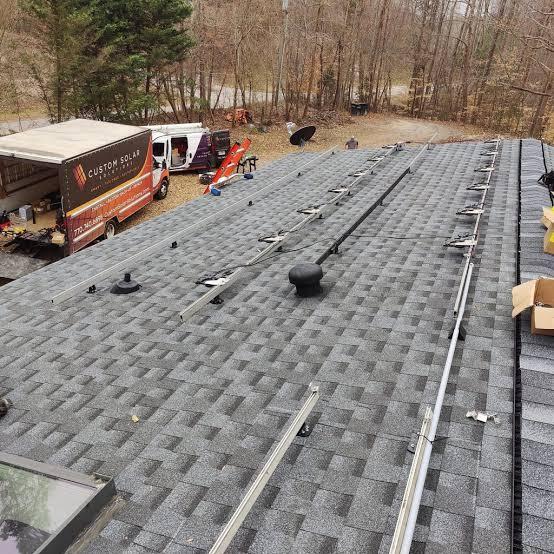
Keep inspection and utility approval visible
The Department of Energy’s permitting and inspection guide distinguishes local permitting and inspection from the utility connection. Record the applicable steps and decision references for each project. A generic completed status should not hide an outstanding approval.
Track installation complete, inspection, authorization to operate, client acceptance, and payment as separate events where required. The field service sales guide covers the earlier difference between an accepted sale and work that has actually been booked.
Follow equipment changes into documents and costs
Keep the approved equipment schedule identifiable before procurement. When a substitution is accepted, update the current files, material requirements, purchasing commitments, and revised price. Preserve the accepted addition alongside the original scope.
Review actual labor and material spending against the estimate, then record the work still expected. A collected-payment total does not show the cost to finish. Our invoicing comparison covers the payment request; project margin needs the spending records too.
Test offline access and required evidence
Mobile access and offline access are different requirements. Scoop’s documented offline field app is a specialist example of field records and capture without a connection. On any shortlisted platform, disconnect the proposed device, enter an observation and photo, reconnect, and inspect what reaches the office.
Scoop’s workflow feature guide also describes required evidence, document history, and project dashboards. Use those as comparison questions: can a stage close without its required photograph, which roles can make an exception, and can a dashboard total be traced to the underlying record? Use those questions to compare the shortlist with the field evidence your team needs.
Close the installation into a service record
Retain the as-built configuration, commissioning files, serial numbers, warranties, and open punch-list items after the installation closes. Our solar asset guide covers the continuing equipment record. The wider asset management guide explains that structure across trades, while the agreement software comparison covers later maintenance obligations.
Run a pilot using a project type the company actually delivers. Include a delayed approval, an equipment change, a return visit, and unfinished work at closeout. Ask another employee to find the current scope and next action. Compare the time spent finding a missing document or resolving a blocked handoff before assuming a wider productivity or revenue result.
Frequently Asked Questions
What is solar project management software?
Solar project management software organizes the stages, people, materials, documents, and costs needed to deliver solar work. It tracks progress from the accepted scope through installation and closeout, with a clear owner for each next action.
Move the inspection date on a sample installation. Check which crew sees the new date, where the current drawing lives, and whether the next billing milestone changes.
Which software is best for a growing solar installer?
FieldPulse is our best solar project management choice for a growing residential or light commercial installer that wants related jobs, tasks, files, and billing together. BuildOps is stronger for complex commercial construction, while ServiceTitan suits larger organizations needing configured project financial control.
Does project software design solar energy systems?
Project software organizes the delivery of solar energy systems; solar design and engineering tools produce array layouts, production models, and technical outputs. The contractor platforms here keep approved files available for quoting, purchasing, and installation. A file attachment does not by itself create an integration with the design system.
Can software automatically obtain permits or utility approval?
Specialist software can automate parts of solar permitting, but a project status cannot grant utility approval. SolarAPP+ performs automated compliance checks for eligible applications in participating jurisdictions. Its eligibility rules cover defined residential systems and exclude commercial, community, and utility-scale systems. Utility interconnection and authorization follow the utility’s process.
Is multi-day work the same as a project?
Multi-day work schedules visits across several days. A project may also need separately controlled phases, purchasing commitments, changes, budgets, and closeout records. A small installation can fit a visit-based structure; a more involved build needs those additional controls.
Does a Gantt chart automatically reschedule dependent work?
A Gantt chart reschedules dependent work only when the software supports that behavior. ServiceTitan’s Planning Tasks guide documents linked-task date recalculation and Auto-Reschedule settings. Its Project Plan remains Private Preview for specific accounts. Confirm the enabled workflow rather than assuming that any dated chart handles dependencies.
What should solar companies track after installation?
Solar companies should track remaining inspections, commissioning, customer acceptance, payment, and utility steps after installation. Preserve the installed configuration, warranties, and service documents so an unfinished obligation remains visible after the crew leaves.
Can Housecall Pro separate installation stages?
Housecall Pro can separate installation stages into segments with their own schedules, tracking, line items, and invoices beneath a parent job. Multiple appointments share job details and one invoice unless progress invoicing is used. Choose segments when stages need separate management or billing.
Can one ServiceTitan project include jobs at different sites?
One ServiceTitan project can contain only jobs or visits at the same location. A customer with several solar sites therefore needs separate location-level project records. Its project structure should keep each site’s installation, return visits, and financial details identifiable.
How should project costs be reviewed?
Project costs should be reviewed against the approved budget, accepted changes, purchasing commitments, and expected spending on unfinished work. Actual spending and forecasts answer different questions. A forecast needs current estimates of the remaining work, while a paid invoice total does not establish project profitability.
How does Service Fusion organize project work?
Service Fusion organizes project work into named phases containing estimates and jobs. Its projects and phases guide explains assigning existing work to a project and phase. Dates, descriptions, and hold status keep the larger scope identifiable.
What should an installer include in the software pilot?
An installer’s software pilot should include an accepted offer, approved design files, several stages, purchasing, and a return visit. Add a delay and an equipment change, then check whether office and field staff can find the current scope, next action, and responsible person.

Olivia Evans
Olivia has more than 10 years of experience researching field-service software for HVAC and other service businesses and improving their marketing and operations. She conducts hands-on workflow tests, documents findings with screenshots and notes, and checks product claims against official vendor documentation.
Author profile →How we test →