

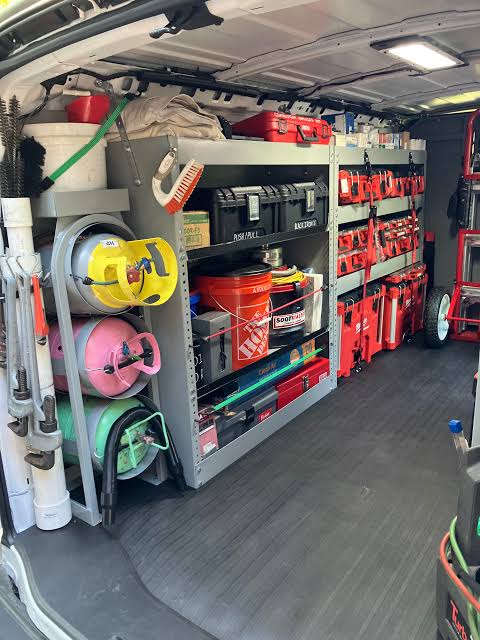
HVAC inventory management software tracks the parts, materials, consumables, and installable equipment a contractor owns, including quantities in the warehouse, on service trucks, and assigned to jobs. This guide is for HVAC contractors and managers comparing systems for residential repairs, replacements, light commercial service, and larger commercial operations.
The useful test is whether office staff can locate the correct capacitor or control board, put it on the right truck, record its use, and replenish it without building a second set of records. Accurate inventory data can improve profitability by reducing duplicate purchases, unbilled materials, and avoidable trips to the supply house. It also helps dispatchers distinguish essential parts available now from materials already committed to another installation.
This guide covers stock that the business consumes, sells, or installs. Our HVAC asset management software guide covers the customer’s installed condenser, furnace, or air handler and its service history. Our HVAC equipment tracking software guide covers company-owned recovery machines, vacuum pumps, gauges, and vehicles. A condenser can start as inventory and become a customer asset after installation; a recovery machine remains company equipment.
Quick Verdict
FieldPulse — best overall value for growing residential HVAC businesses, with support for light commercial work. Native inventory management is included in the base subscription. Truck and warehouse hubs, location quantities, replenishment levels, transfers, counts, purchasing, and serialized equipment connect stock with the wider service workflow.
ServiceTitan — best for large operations needing formal inventory controls. Native Purchasing and Inventory modules support trucks, warehouses, requisitions, transfers, serialized units, receiving, counts, and accounting. That depth requires a substantial setup and a team that follows the process consistently.
BuildOps — best for complex commercial HVAC operations. Native stock visibility, purchasing, mobile parts logging, location transfers, and project cost context suit companies delivering service and construction work together. It is more system and expense than most small residential shops need.
QuoteIQ — a broad native option on Elite and Max. Its inventory management tools include stock locations, suppliers, products, purchase orders, thresholds, transactions, and analytics. Its lighter HVAC operations and the loading and offline problems observed in the estimating workflow keep it below my leading choices.
Housecall Pro — suitable for material usage tracking, with Ply for full stock control. Native source, vendor, purchase-status, and material reports help explain job usage. Truck quantities, warehouse stock, transfers, scanning, and replenishment come through separate inventory management tools such as Ply.
Jobber — a straightforward service platform with external inventory. Its Products & Services catalog is useful for quotes and invoices, but it is not a native stock ledger. Separate inventory management software such as Ply can suit an existing small team, with additional subscription and synchronization responsibilities.
FieldEdge — a conditional choice for an established integrated setup. Its Elite warehouse feature depends on QuickBooks Desktop Enterprise with Advanced Inventory. Ply provides another external stock route, with specific work-order and purchasing boundaries. It is not my first choice for a new native inventory setup.
HVAC Inventory Software Compared
The prices below describe published, observed, or reported configurations in US dollars. They use different seat allowances and billing terms, and an external inventory subscription is additional to the field service platform.
| Platform | Best fit | Inventory strengths | Main drawbacks | Pricing basis |
|---|---|---|---|---|
| FieldPulse | Growing residential teams and light commercial work | Native hubs, location quantities, replenishment levels, transfers, counts, purchasing, serialized units | More configuration ownership than a basic item list | Around $99/user/month before discounts; native inventory included in the base subscription |
| ServiceTitan | Large, structured service organizations | Native inventory and purchasing, requisitions, serialized control, mobile counts, accounting | Heavy implementation and process requirements | Reported $250–$500/technician/month plus implementation; configuration affects the package |
| BuildOps | Complex commercial service and projects | Native location stock, reserved quantities, min/max, mobile purchasing, parts-to-job costs | More expense and complexity for ordinary residential work | Custom quote; reported around $299+/user/month |
| QuoteIQ | Teams prioritizing broad native functionality | Warehouse, truck, employee stock, thresholds, orders, transactions, analytics | Inventory requires Elite or Max; lighter HVAC depth; observed field reliability concerns | Elite $299.99/month for ten users; lower plans’ material lines are not the inventory system |
| Housecall Pro | Existing residential users adding a separate stock system | Native material usage and sourcing; Ply adds location inventory and purchasing | Full inventory is external; industry signup premium | HVAC signup displayed $79/month versus $59 for handyman; Ply subscription additional |
| Jobber | Existing small teams with simple service operations | Reusable catalog and job records connected to Ply stock | No native inventory ledger; integration excludes some records | Connect: $99/month annually billed or $139 monthly for one user; five users $149 or $199; Ply additional |
| FieldEdge | Established QuickBooks-centered fleets | Purchases and replenishment; Elite/QBD warehouse route or separate Ply stock | External system remains central; integration and plan dependencies | Reported $100–$125/user/month plus $500–$2,000 setup; required accounting or Ply costs additional |
| For a clean-start HVAC company with one warehouse and three trucks, the Ply Starter quote I obtained was $280 per month. That is an observed four-location configuration, rather than a universal per-truck price. Ply prices by stock locations and includes unlimited users. |
How We Tested
Testing at a glance
- Review period
- October 2026
- Devices
- Desktop and iPhone
- Evidence
- Trial and paid-account observations, combined with current official inventory, purchasing, and integration documentation.
- Focus
- Establishing stock records, locating available parts, recording movement and usage, replenishing inventory, using field tools, and maintaining reliable counts and accounting handoffs.
For this October 2026 comparison of HVAC inventory management software, the Tools in the Wild editorial team evaluated seven field service platforms: BuildOps, FieldEdge, FieldPulse, Housecall Pro, Jobber, QuoteIQ, and ServiceTitan. We combined observations from trial and paid accounts on desktop and iPhone with current official inventory, purchasing, and integration documentation. The business-fit assessment covers owner-operators through companies with roughly 50 technicians.
I evaluated the inventory controls that matter when parts move through an HVAC business:
- Establishing the stock record: Reusable item catalogs versus actual inventory items, quantities, locations, units, costs, and individually identified equipment.
- Locating available parts: Separating warehouse stock, truck stock, assigned materials, and incoming purchases.
- Recording movement and usage: Receipts, transfers, job consumption, returns, damaged items, and corrections.
- Replenishing stock: Minimum levels, reorder rules, purchase orders, supplier records, and the distinction between an alert and a completed purchase.
- Working in the field: Access to stock and purchasing from a phone, plus the point at which recorded work changes the quantity.
- Maintaining reliable counts: Physical counts, barcode-supported workflows, audit history, permissions, and accounting handoff.
The review distinguishes native features from paid integrations and assesses how the stock record connects with jobs and accounting. Read the Tools in the Wild editorial methodology.
What Is HVAC Inventory Management Software?
HVAC inventory management software maintains the stock record for repair parts, installation materials, consumables, and equipment waiting to be installed. It answers practical questions: how many units are available, where they are, what has been used, what is on order, and what needs replenishing.
A pricebook answers a different question: what items and services can the company add to an estimate or invoice, and at what price? A reusable entry for a blower motor does not establish that one is on Truck 3. A material usage report can show that technicians used six motors last month without maintaining stock levels in each location. HVAC inventory software needs both usable item records and a reliable inventory process.
HVAC Parts and Consumables
For HVAC contractors, the main stock categories include:
- Repair parts: Capacitors, contactors, motors, control boards, sensors, and other HVAC parts needed to complete service calls.
- Installation materials: Copper fittings, line sets, pads, drain components, electrical materials, and other items assigned to replacements or new installations.
- Consumables: Filters, sealants, fasteners, and refrigerant quantities recorded using appropriate units.
- Installable equipment: Furnaces, condensers, air handlers, and other units held before installation, with serial-level identification where the system supports it.
Recording refrigerant quantities is one part of the stock process. It does not, by itself, establish leak reporting, cylinder custody, recovery records, or regulatory compliance. Those require the appropriate documented service and compliance workflow.
Inventory vs. Asset Management and Company Equipment
An unused condenser in the shop is inventory. Once installed at a customer’s address, its model, serial number, warranty, condition, and repair history belong in the customer asset record. A company-owned vacuum pump is reusable service equipment: its assignment and availability matter, rather than deducting it as a part sold on an invoice. An AC unit can therefore move from stock into an installed asset, while high-value equipment the company keeps remains an internal resource.
These records can connect inside one platform, but they should retain their different purposes. This inventory guide focuses on the parts and materials moving through the business; the linked asset and equipment guides examine the other two workflows.
HVAC Inventory Management Features Compared
The matrix distinguishes the location stock system from the surrounding field service application. An integration can be useful, but its price, record flow, and daily work remain part of the comparison.
| Capability | FieldPulse | ServiceTitan | BuildOps | QuoteIQ | Housecall Pro | Jobber | FieldEdge |
|---|---|---|---|---|---|---|---|
| Stock ledger | Native, included in base subscription | Native Inventory and Purchasing modules | Native purchasing and inventory | Native on Elite and Max | External Ply or accounting inventory | External system such as Ply | Elite/QBD warehouse configuration or external Ply |
| Location quantities | Hubs for warehouse, truck, van, and other stock locations | Trucks and warehouses with configured locations | Warehouses, trucks, and job sites | Warehouse, truck, and employee locations | Ply maintains the stock locations | Ply maintains the stock locations | QBD warehouse route; Ply locations in the integration route |
| Replenishment | Hub-specific levels and purchasing | Replenishment, transfers, requisitions, and POs | Min/max and location stock visibility with purchasing | Product thresholds, low-stock status, and orders | Native usage informs purchasing; Ply supplies stock rules | Ply supplies stock rules | FieldEdge part requests/QB or separate Ply purchasing |
| Field workflow | Mobile stock and count tools; setup on web | Configured Inventory Mobile App for receiving, transfers, and counts | Mobile stock, parts logging, POs, and receipt scans | Mobile inventory and material-linked invoices | HCP material details plus separate Ply stock workflow | Jobber job items connected to Ply | FieldEdge work-order material and warehouse selection in Ply route |
| Link to billed work | Configurable Material List or Invoice deduction; serialized unit can become an asset | Inventory, purchasing, job, and accounting processes connect | Logged parts connect to invoice and job costs | Linked material stock deducts when invoice is paid; earlier option on partial-payment screen | Usage and cost records connect with Ply integration | Synced materials and kits connect with Ply jobs | Work-order materials flow from FieldEdge to Ply |
| Main trade-off | Consistent deduction rules and clean item setup | Highest configuration and administration | Commercial depth can exceed residential needs | Inventory tier and field reliability | Separate stock subscription and integration | Separate stock subscription; some record types do not sync | Multiple systems and distinct purchasing boundaries |
FieldPulse: Best Overall Value for Growing Residential HVAC Businesses
Verdict: FieldPulse provides the best overall balance for a growing residential HVAC company that wants native inventory connected to estimates, jobs, invoices, purchasing, and customer assets. Inventory is included in the base subscription, and the platform also supports light commercial work.
Its advantage is the connection between the stock record and the technician’s actual work. The office can maintain a central supply of filters and contactors while each truck has its own quantities and replenishment levels. A replacement installation can use a material list without losing the detailed items behind the customer’s package price.
Main trade-off: The company must define consistent item names, stock units, hubs, user access, and deduction rules. A flexible native system still depends on technicians recording the correct item and source location.
Stock Levels, Purchasing, and Counts for HVAC Contractors
Inventory Hubs maintain quantities by stock location. A warehouse can hold bulk stock while each service van carries a smaller working quantity. Hub-specific replenishment levels and transfers help the office distinguish a truck shortage from a company-wide shortage.
This makes FieldPulse’s HVAC inventory software useful for a team that wants to manage inventory in the same application as its service work. Warehouse managers can review stock levels centrally while HVAC techs use the relevant location in the field. The inventory management system still needs recorded movements to reflect physical stock.
FieldPulse also provides purchase orders, material lists, and mobile barcode scanning. Its inventory count workflow compares the actual count with the expected quantity, records who counted and when, and allows the user to log the count separately from changing the hub quantity. That distinction is useful when a manager wants to investigate a missing control board before accepting an adjustment.
Deduction and Serialized Equipment
Inventory deduction settings establish whether stock is spent through completed Material Lists or finalized Invoices, with record-level controls for authorized roles. Linked records coordinate deduction so the same recorded quantity is not spent twice. Initial configuration is web-based, while supported record controls and counts work on mobile.
The important operating decision is when the company considers a part consumed. Leaving an installation’s materials unrecorded until someone catches up with paperwork can leave a misleading available quantity, even in software with automatic deduction.
Serialized Inventory identifies individual units, carries a selected serial onto the invoice, and can create the installed customer’s asset record from that line. This is valuable for a condenser or furnace that needs a clear path from received stock to future warranty and service work.
Price and Value
The subscription observed for this review was around $99 per user per month before discounts, with native inventory included in the base price. Optional Sales Suite, Custom Forms, and premium services serve other needs and can change the overall configuration.
FieldPulse is especially good value when the company would otherwise pay for both HVAC software and a separate stock system. A dedicated inventory integration can still offer worthwhile purchasing depth; the native label alone is not the reason to choose FieldPulse. Its HVAC inventory software balances location inventory, field operations, and detailed customer records at a manageable scale. The sales team can prepare replacement work from shared items while the office manages availability.
ServiceTitan: Best for Enterprise Inventory Controls
Verdict: ServiceTitan is the strongest option here for large HVAC operations that need formal stock, purchasing, receiving, requisition, and accounting processes across teams and locations.
Its native inventory tools suit a business where purchasing staff, warehouse employees, technicians, installers, and finance each own different steps. The goal is more than seeing a quantity: the business needs controlled movement from a supplier through a location and into the job and financial record.
Main trade-off: Setup and ongoing administration are substantial. Inventory items, locations, vendors, permissions, beginning counts, and accounting must agree before the numbers become useful.
HVAC Inventory Software for Larger Organizations
ServiceTitan’s Inventory module works with its Purchasing module. The configured workflow covers stock locations, transfers, replenishment, adjustments, job transfers, install requisitions, and serialized units.
For a large HVAC company, an installation requisition can help separate equipment and materials committed to a sold replacement from stock available for another call. Truck replenishment can then pull from the main warehouse or initiate supplier purchasing through the appropriate process. Its HVAC inventory software connects the sales team’s sold scope with materials tied to the work, while configured accounting systems receive the financial transactions.
Inventory tracking must be enabled for the relevant pricebook materials and equipment. That makes item setup consequential: a reusable pricebook entry and an inventory-tracked item do not become equivalent simply because their descriptions match. Customizable templates standardize the inventory management setup across locations.
Mobile Receiving and Accountability
The configured Inventory Mobile App supports receiving purchase orders, processing transfers, and performing cycle counts. Barcode-supported transactions help identify the correct item, with the barcode first associated with its pricebook record.
These controls make sense for a stockroom team managing large volumes of parts and equipment. They also require consistent receiving, issuing, return, and count procedures. Automatic calculations cannot account for a motor that leaves the shelf without being recorded.
Price and Value
Reported subscriptions were approximately $250–$500 per technician per month, with implementation reported from $5,000 to $50,000 or more. Modules, company size, data cleanup, and implementation scope affect the package.
ServiceTitan makes sense when centralized inventory and financial controls solve an existing scale problem. FieldPulse is the more proportionate option for most growing independent residential teams. BuildOps is especially relevant when commercial projects and their procurement commitments drive the decision.
BuildOps: Best for Complex Commercial HVAC Inventory
Verdict: BuildOps is the strongest fit for complex commercial HVAC businesses that need stock and purchasing connected to service work, project phases, job costs, and commercial financial processes.
A phased rooftop-unit project can involve parts held in a stockroom, material moved to a site, field purchases, subcontract commitments, and changes to approved scope. The office needs visibility into both physical stock and the costs committed to that delivery.
Main trade-off: The surrounding commercial system can be more expensive and elaborate than a residential contractor needs for stocking ordinary repair parts.
Stock and Field Purchasing for HVAC Companies
BuildOps purchasing and inventory provides location stock visibility, on-hand and reserved quantities, min/max thresholds, and transfers among warehouses, trucks, and job sites. Technicians can review truck stock, log used parts, and create purchase orders from mobile.
For commercial HVAC companies, this HVAC inventory software connects location stock levels with the work being delivered. Its real-time inventory tracking reflects recorded receipts, transfers, and parts use; a physical discrepancy still requires a count and correction.
OpsAI can read a PO or receipt photo and fill vendor, date, and item information for review. That is a concrete use of AI in purchasing; it should not be confused with a guarantee that the physical stock count is correct.
Parts recorded on a job connect to the invoice and job report. This helps the commercial office follow costs as work happens instead of rebuilding the material record after the project team has moved on.
Procurement and Commercial Cost Control
The wider procurement workflow connects purchase orders, receipts, and vendor bills with the job and financial records. That supports reviewing committed and actual costs rather than treating the supplier invoice as the first sign of spending.
This is particularly useful for commercial maintenance and construction operations sharing stock. Physical counts still need reconciliation: a software quantity reflects the movements the team entered, not an independent observation of everything on the shelf.
Price and Value
BuildOps uses custom pricing, with reported figures around $299 or more per user per month, depending on modules and headcount. Implementation was included in the configuration described for this review; migration and specialized requirements affect the package.
The value comes from using its commercial operating depth. For residential service and straightforward light commercial work, FieldPulse provides a more manageable balance. For a commercial company coordinating service, projects, purchasing, and finance, BuildOps offers a clearer reason to accept the additional system. It is HVAC inventory software designed specifically for the surrounding demands of commercial operations.
QuoteIQ: Native Inventory With a Higher Plan Requirement
Verdict: QuoteIQ provides genuine native inventory management on Elite and Max, with broader stock functionality than a simple materials list. It is a practical option for teams prioritizing broad HVAC inventory software, although its HVAC-specific operations and observed field reliability are less convincing than my leading choices.
During the tested estimating workflow, routine screens frequently took 6–10 seconds to load, and offline mode produced missing estimate views and errors when creating new estimates. Those observations concern the estimating experience; they do not establish that inventory transactions failed. They still matter to a business choosing one mobile application for the complete service workflow.
Main trade-off: Inventory requires Elite or Max. Adding materials to an estimate on a lower plan does not provide the same stock-location and transaction system.
Locations, Orders, and Stock Records
QuoteIQ’s inventory system maintains products, suppliers, warehouse/truck/employee locations, purchase orders, quantity thresholds, and transaction history. Supported movements include receipts, issued stock, returns, damaged items, losses, and adjustments.
An HVAC company can separate shop supplies from a technician’s stock and flag low quantities. Product units such as each, roll, or pound help keep a capacitor count distinct from a refrigerant quantity. These are stock controls, while the customer asset record and refrigerant service documentation serve separate purposes. This HVAC inventory software gives the team an inventory management system rather than only a billable material list. QuoteIQ can approximate customer asset tracking with notes and forms, but it lacks a dedicated asset management feature. Its native inventory module serves the separate stock workflow.
Material Use and AI Support
The materials-to-inventory link fills cost from the inventory product and deducts stock when the invoice is paid. A deposit or partial payment does not automatically settle that invoice; its payment screen provides an earlier deduction option. This timing matters when parts are used before the customer pays the balance.
QuoteIQ also documents inventory actions through its native AI-assistant connector, including products, suppliers, orders, stock, and low-stock reorders. The available tools follow the subscription’s features. This is conversational access to the operating system, rather than evidence of demand forecasting or permission to place unchecked orders.
Price and Value
Elite costs $299.99 per month for ten users and includes inventory; Max also includes it. Pro costs $199.99 per month for four users, but does not provide the same native inventory module. The lower plans’ materials section remains useful for document preparation.
QuoteIQ’s user allowance can make the combined subscription attractive. FieldPulse remains my preference for growing HVAC businesses that need stronger connected equipment, maintenance, and operational records. A broad feature list is useful only when the team can operate it reliably in the field.
Housecall Pro: Material Usage Tracking, With Ply for Full Inventory
Verdict: Housecall Pro provides useful native material sourcing and usage information, but it does not include a full native inventory-management system. It is most relevant here for an existing residential team willing to add Ply or use an accounting-led stock workflow.
Its clean job workflow can suit repeatable residential service. A company that needs actual warehouse and truck quantities, transfers, scanning, and automated replenishment must include the external inventory system in the decision.
Main trade-off: The native material record and the external stock ledger serve different purposes. The company pays for and maintains the connection between them.
What Housecall Pro Tracks Natively
Material Inventory Detail Tracking adds source, purchase status, and vendor to material line items or internal job inputs on web and mobile. The Material on Jobs report shows material usage across jobs and employees, with quantity, job counts, filters, and CSV exports.
This helps identify which jobs used contactors or which technician bought materials from a supplier. It does not answer how many contactors remain in Truck 2 or automatically maintain every storage location’s quantity. The Price Book is a saved catalog, not the missing stock ledger.
What Ply Adds
The Ply integration connects material catalogs and adds truck and warehouse stock, allocations, transfers, scanning, replenishment, and purchasing tools. Active accounts are required in both services.
Ply can offer substantial inventory depth, so an integration should be judged on its actual workflow rather than dismissed because it is separate. The trade-off is another subscription and the need to keep item identity, technician locations, and job usage aligned. Housecall Pro’s user-friendly job screens do not remove the separate inventory management work.
Price and the Industry Signup Premium
In our October 2026 signup comparison, HVAC, plumbing, and electrical showed a $79 monthly starting subscription, compared with $59 for handyman, without an identifiable difference in available functionality or configuration. That industry premium did not supply a native inventory ledger.
Ply is an additional subscription. For the clean-start configuration I priced—one warehouse and three trucks—Starter was quoted at $280 per month. Higher Housecall Pro plans and other add-ons change the combined cost further.
Housecall Pro plus Ply can be sensible for an established team that likes its service workflow. For a new buyer prioritizing native HVAC inventory software and broader flexibility, I prefer FieldPulse.
Jobber: Simple Service Operations, With External Stock Control
Verdict: Jobber is approachable for a solo operator or small team handling straightforward service work, but it has no native inventory ledger. It needs an integration such as Ply when truck and warehouse stock become a purchasing priority.
The Products & Services catalog stores reusable labor, material, and equipment entries for quoting and billing. That is useful standardization, but it does not maintain a live count of owned parts across multiple locations. Jobber’s user-friendly service workflow can be a straightforward solution for small businesses whose stock needs are handled separately.
Main trade-off: The simplicity of Jobber’s core application does not remove the setup needed for a separate stock system. Staff must understand which records sync and where changes belong.
Jobber and Ply Together
The Jobber–Ply integration connects jobs and products with Ply’s stock workflow. Ply can send materials and kits into Jobber job line items, and stock availability can appear through Jobber custom fields. This inventory management route keeps Jobber as the service application while Ply supplies the inventory data.
The integration has meaningful boundaries. Images, categories, services, and purchase orders do not all transfer as complete equivalent records. A Ply PO reference can appear in Jobber job notes, while an ad hoc Jobber line item without a linked product does not sync as a Ply material.
That distinction matters when a technician adds a one-off motor to an invoice. The bill can look correct while the separately managed stock record still depends on a recognized inventory product and the proper workflow.
Price and Fit
Standard Connect pricing is $99 per month with annual billing or $139 monthly for one user; the five-user configuration is $149 annually billed or $199 monthly, before promotions. Core also supports ordinary service documents, while features and accounting connections vary by tier. Ply is additional.
An existing Jobber team may gain more by adding dedicated inventory software than by changing its entire service platform. For a new HVAC company seeking native stock, customer equipment records, purchasing, and room for more varied work, FieldPulse offers a stronger integrated starting point.
FieldEdge: A Conditional Integrated Inventory Setup
Verdict: FieldEdge can support an established company’s inventory workflow through its accounting and inventory connections, but it is not my first recommendation for a new native inventory setup.
The key distinction is the system maintaining stock. Its documented Elite warehouse feature uses QuickBooks Desktop Enterprise with Advanced Inventory. Ply offers a separate stock route, with its own catalog, location, and work-order rules.
Main trade-off: A FieldEdge feature name does not make the entire stock process independent of external software. The plan, accounting configuration, and integration boundaries remain central to operation and cost.
The QuickBooks Warehouse Route
FieldEdge’s plan comparison lists purchases and replenishment across its plans, but places Warehouse Inventory Management on Elite with the explicit QuickBooks Desktop Enterprise Advanced Inventory requirement.
That can suit a fleet already committed to the required accounting setup. It is a larger dependency for a business starting from scratch or seeking a cloud-first stock workflow. QuickBooks Online connectivity should not be treated as the same configuration as that specifically documented warehouse feature.
The Ply Route
Ply’s FieldEdge workflow keeps work-order materials entered in FieldEdge. The selected warehouse identifies the Ply location from which stock is deducted. Catalog and location synchronization are separate from work-order material flow, which runs from FieldEdge to Ply.
Purchasing and FieldEdge part requests are outside that particular integration flow. They continue through their existing process rather than becoming a fully synchronized Ply purchasing record. Picking the wrong warehouse also deducts from the wrong location, making technician training consequential.
Price and Value
Reported FieldEdge pricing was approximately $100–$125 per user per month, plus $500–$2,000 setup. The Elite package, required QuickBooks configuration, or separate Ply subscription adds to the cost of the usable inventory workflow.
Existing users may reasonably value accounting continuity. For new buyers, FieldPulse offers a clearer native HVAC inventory software proposition, ServiceTitan provides deeper enterprise controls, and BuildOps is stronger for complex commercial delivery.
What Ply Adds to the Cost and Workflow
Ply is a separate inventory and purchasing product, not a feature included with a Jobber or Housecall Pro seat. It manages stock across warehouses and trucks and connects with supported field service software.
The $280 monthly Starter quote I obtained covered one warehouse and three trucks with no historical data to migrate. Ply’s published pricing is location-based rather than a public fixed per-user rate. The quotation should be read as the actual configuration reviewed, rather than multiplied into a universal pricing formula.
Starter includes unlimited users, stock locations, kits, consumable tracking, cycle counts, scanning, low-stock notifications, purchase orders, replenishment lists, and min/max tools. Plus adds capabilities such as live supplier catalogs, rolling replenishment, PO approval workflows, three-way matching, and accounting integrations.
Ply’s current pricing page includes hands-on onboarding, stock-location setup, importing inventory, and training. The clean-start quote carried no mandatory onboarding fee. Standard startup help should not be confused with a separate bespoke data-cleanup or migration project.
The value question is whether the combined system does the work better for the company. Native inventory can reduce handoffs, while a dedicated product may provide more specialized purchasing depth. Compare the whole subscription and the actual movement of catalog items, job materials, quantities, orders, and accounting records. User licenses, stock locations, and required integrations are different pricing units.
How to Choose HVAC Inventory Software for Your Business
Identify High-Use Parts and Locations
Start with the parts that most often cause a second trip: common capacitors, contactors, motors, filters, and control boards. Use consistent item identifiers and units, then establish a warehouse and a location for each stocked truck. A truck count should mean the physical parts on that truck, rather than the total materials its technician has ever used.
An HVAC inventory system should help HVAC contractors manage inventory for routine demand and specialized parts without treating them identically. Maximum and minimum quantities can differ by location and expected work. A warranty job may use a replacement part without charging the homeowner for that part, so the inventory tracking still needs to record what left stock.
Record Stock Movements

Next, define when stock leaves a location. Receiving a purchase, transferring to a truck, using on a job, returning an unused part, and writing off a damaged item are different events. The system should retain those distinctions rather than encouraging staff to fix every discrepancy by overwriting a quantity.
Connect Inventory to Accounting
Finally, connect the stock process to installation planning and accounting. A replacement can need a serialized unit, its matching equipment, and a reusable material combination. The customer-facing package price and internal parts record can look different while still representing the same authorized work.
The strongest system is the one the team can keep accurate. Native features, external integrations, mobile access, and automated replenishment are useful only when item setup, physical movement, and recorded usage agree.
Inventory Management and Other Business Processes
HVAC inventory software connects purchasing, scheduling, billing, and other business processes when shared item records move with the job. The sales team needs realistic availability before promising an installation, and customer communication improves when the office can explain whether a required part is held, ordered, or delayed. Reliable inventory management can support customer satisfaction without promising that software alone will prevent every callback.
The key takeaways for HVAC contractors are practical: select stock units carefully, record parts used, and keep counts current. HVAC software can give real-time visibility into those entries, but an unrecorded movement remains an error. A new system needs clear ownership of the data as well as mobile access for the people moving parts.
Frequently asked questions
Which HVAC inventory management software is best for a growing residential business?
FieldPulse is the best overall choice here for a growing residential HVAC business that wants native stock control connected to service operations. It includes inventory in the base subscription, supports truck and warehouse hubs, and gives the company room for light commercial work. ServiceTitan fits larger organizations, while BuildOps is strongest for complex commercial delivery.
Does Jobber have built-in inventory management?
No, Jobber does not have built-in inventory management. Its reusable Products & Services catalog supports quoting and billing, but location quantities, transfers, replenishment, and stock counts require a separate system such as Ply.
Does Housecall Pro track truck and warehouse inventory natively?
No, Housecall Pro does not natively maintain truck and warehouse inventory quantities. Its material detail fields and reports show sourcing, purchase status, vendors, and job usage. Ply supplies the separate stock-location and replenishment workflow.
Can HVAC technicians check inventory from their phones?
Yes, HVAC technicians can check inventory from their phones in the supported native or integrated workflows compared here. FieldPulse provides mobile inventory access, BuildOps connects truck stock with field purchasing, and ServiceTitan has a configured Inventory Mobile App. Jobber and Housecall Pro rely on their external inventory setup for actual stock quantities.
What is the difference between an HVAC pricebook and inventory management?
An HVAC pricebook stores reusable items, service descriptions, costs, and selling prices. Inventory management maintains the quantities and movements of physical stock. A saved capacitor entry can help create a quote without proving that the correct capacitor is available on a truck.
How much does Ply cost for one warehouse and three trucks?
The Ply Starter quote I obtained for one warehouse and three trucks was $280 per month for a clean-start business. That was a four-location configuration with unlimited users and no mandatory ordinary onboarding fee. It is the observed quote for this review, rather than a universal published rate.
When does QuoteIQ deduct inventory used on a job?
QuoteIQ deducts inventory-linked materials when the invoice is paid. Marking a job complete or collecting only a deposit does not automatically produce that same result. An earlier deduction option is available on the deposit or partial-payment screen, and inventory linking requires Elite or Max.
Can inventory software track an HVAC unit by serial number?
Yes, inventory software can track an HVAC unit by serial number when it supports serialized stock. FieldPulse identifies individual units and can create a customer asset from a serialized invoice line. ServiceTitan also supports serialized inventory through its configured stock workflow. A product barcode and a unique equipment serial number serve different purposes.
Can inventory software manage refrigerant compliance automatically?
Inventory software does not establish refrigerant compliance merely by recording pounds purchased or used. Stock quantities, cylinder handling, equipment service records, recovery, leak documentation, and required reporting are different records. Use the appropriate documented workflow for the actual compliance obligation.
Does FieldEdge inventory require QuickBooks?
FieldEdge’s documented Elite Warehouse Inventory Management feature requires QuickBooks Desktop Enterprise with Advanced Inventory. A separate Ply integration provides another stock route, with work-order material flow and purchasing boundaries of its own. Those configurations should not be treated as one identical native inventory system.
Can stock move from a warehouse to a service truck without counting as a sale?
Yes, stock can move from a warehouse to a service truck as a transfer rather than a sale. FieldPulse, ServiceTitan, BuildOps, and the Ply workflows support location-based movement. The transfer changes where the item is held; the later job-use or invoice event records its consumption under the configured process.
Does a low-stock alert automatically mean a supplier order has been placed?
No, a low-stock alert does not automatically mean a supplier order has been placed. A threshold warning, replenishment list, draft purchase order, approved order, and received delivery are different stages. The available automation and approval process determine how far the software carries the restocking task.
How do custom fields help HVAC inventory tracking?
Custom fields help HVAC inventory tracking by keeping business-specific item details consistent with the stock record. Jobber can display Ply availability through its custom fields, while the underlying inventory management stays in Ply. The field should explain a useful item attribute or stock value rather than becoming a second manually maintained count.
Should small businesses choose a free tier for HVAC inventory software?
Small businesses should choose a free tier only when it supports the stock workflow they actually need. HVAC inventory software must identify the relevant parts, locations, quantities, and movements; a free catalog alone does not do that. Compare the usable paid configuration with the cost of a separate stock application, rather than choosing on the entry price alone.
Is QR code scanning the same as recording a serial number?
No, QR code scanning is not the same as recording a serial number. In a workflow using QR code scanning, barcode labels identify the stock item, while serial numbers distinguish individual units. HVAC techs still need the correct transaction and quantity when they receive, move, or use HVAC parts.
Does mobile access mean the inventory workflow also works offline?
No, mobile access does not establish offline access for every inventory transaction. An app can display a saved record while a stock movement or supplier action depends on a live connection. Evaluate HVAC inventory management software around the operations performed at the job site and the way entries synchronize after reconnecting.

Olivia Evans
Olivia has more than 10 years of experience researching field-service software for HVAC and other service businesses and improving their marketing and operations. She conducts hands-on workflow tests, documents findings with screenshots and notes, and checks product claims against official vendor documentation.
Author profile →How we test →