
Plumbing estimating software helps contractors calculate labor, materials, equipment, and other job expenses, apply markups, and produce one estimated selling price. This guide is for residential plumbing business owners and managers comparing tools for repairs, water-heater replacements, fixture installations, and repipes. Choosing the right plumbing estimating software helps technicians build estimates faster, reduce calculation errors and manual entry, and protect profit margins before work begins.
The useful test is whether a plumber can price the complete job at the property: the replacement part or appliance, associated fittings, installation time, removal, and any additional work identified during inspection. A fast estimate is only useful when its total reflects the work the company will actually perform.
FieldPulse offers the best overall balance for growing residential teams; the other platforms suit different levels of calculation, field control, and operational complexity.
Quick Verdict
FieldPulse — best overall for growing residential plumbing businesses. Mobile cost entry, markup and target-margin tools, formula-based quantities, bundles, and purchasing connections make it the most flexible option for varied repairs and replacements without ServiceTitan’s implementation burden.
Housecall Pro — best for straightforward residential estimates. Its cleaner builder, customer search, one-off items, and checklists help small shops price familiar work quickly. Important estim
ate cost controls remain stronger on desktop.
Jobber — best for simple mobile estimating. Its approachable iPhone workflow suits a solo operator or small crew pricing a manageable service list. Desktop quote markups are useful, but it lacks FieldPulse’s quantity formulas and reusable bundle controls.
ServiceTitan — best for large teams with centralized pricing rules. Pricebooks, permissions, templates, and configured mobile margin checks help larger operations standardize estimating across departments and branches. Cost and administration are the main tradeoffs.
QuoteIQ — broad mobile tools with reliability drawbacks. Itemized estimates, cost entry, markups, and mobile AI provide substantial functionality. Loading delays, offline errors, and less developed trade-specific operations weakened the field experience.
BuildOps — best for commercial and project-heavy plumbing contractors. Detailed quoting and revisions connect to commercial project management. That depth is difficult to justify for a shop focused on short residential service calls.
FieldEdge — not my first choice for flexible estimating. Its managed repair database is useful, but the combination of customization limits, setup, and reported cost makes the alternatives clearer choices for most new buyers.
Plumbing Estimating Software Compared for Residential Contractors
Prices are in US dollars. Published plans and reported configurations are identified separately because user allowances, billing terms, modules, and implementation charges differ.
| Platform | Best fit | Estimating strengths | Main drawbacks | Pricing basis |
|---|---|---|---|---|
| FieldPulse | Growing residential teams handling varied work | Mobile costs, markup and target margin; formulas; bundles; material lists | Denser interface; complete profit analysis remains on desktop | Reviewed rate: about $99/user/month; Sales Suite and other modules extra |
| Housecall Pro | Small shops with repeatable residential jobs | Fast builder; one-off items; checklists; desktop expected-profit visibility | Industry-based upcharge; less flexible organization; mobile cost-entry limits | Observed plumbing signup: $79/month; flat-rate pricing requires Essentials, starting at $229/month for 1–5 users |
| Jobber | Solo plumbers and small teams | Fast mobile workflow; reusable catalog; desktop quote cost, markup, and estimated margin | Fewer calculation and assembly tools; desktop/mobile gap | Grow for one user: $149/month annually or $199 monthly, before promotions |
| ServiceTitan | High-volume or multi-branch service businesses | Central pricebooks; templates; permissions; configured margin checks | Expensive implementation and ongoing administration | Reported $250–$500/technician/month; implementation extra |
| QuoteIQ | Small crews prioritizing broad mobile features | Itemized estimating; cost and markup entry; saved items; mobile AI | Loading and offline problems; no supplier integration | Pro: $149.99/month for four users; Elite: $299/month for 10 |
| BuildOps | Commercial service and complex projects | Reusable item catalog; cost detail; quote versions; project handoff | More commercial complexity than most residential shops need | Custom quote; reported around $299+/user/month |
| FieldEdge | Teams prioritizing managed repair content | Maintained repair database; field-to-office workflow | Less flexibility for the cost; setup expense | Reported $100–$125/user/month plus $500–$2,000 setup |
How We Tested
Testing at a glance
- Review period
- October 2026
- Devices
- Desktop and iPhone
- Evidence
- Trial and paid accounts; desktop and iPhone workflows checked against official documentation.
- Focus
- Building estimates, calculating selling prices, documenting uncertainty, revising scope and quantities, and comparing iPhone calculations with desktop workflows.
- Scope / limits
- Specialist design, digital takeoff, and construction bidding systems are outside scope.
For this October 2026 comparison, the Tools in the Wild editorial team examined BuildOps, FieldEdge, FieldPulse, Housecall Pro, Jobber, QuoteIQ, and ServiceTitan using trial and paid accounts. We worked through desktop and iPhone workflows, cross-checked product capabilities with official documentation, and considered how each system fits plumbing contractors ranging from owner-operators to companies with roughly 50 technicians.
I evaluated the estimating process across five practical tasks:
Building the Estimate
- Adding labor, materials, equipment, quantities, and reusable combinations of related items.
Calculating the Selling Price
- Entering costs, applying markups or target margins, and identifying which expenses the profitability calculation includes.
Handling Uncertainty
- Documenting assumptions and exclusions while producing one calculated total for the defined scope.
Revising the Estimate
- Changing the selected equipment, quantities, material pricing, or scope without rebuilding the document.
Working in the Field
- Comparing the calculations available on iPhone with desktop, including saving and behavior when the connection changes.
These are full field service software platforms with estimating functions. The comparison concentrates on calculating residential plumbing jobs and carrying the information into scheduled work. It does not rank specialist design, digital takeoff, or construction bidding systems. Plumbing estimators working from digital plans may need a separate measurement workflow before entering quantities here.
Read the full Tools in the Wild editorial methodology.
What Is Plumbing Estimating Software?
Plumbing estimating software calculates the expected cost and selling price of plumbing work from parts, fixtures, equipment, labor, and other expenses. For a water-heater replacement, the calculation may include the heater, connections, valves, installation and removal time, disposal, and the additional work included in the scope. For a repipe, pipe lengths, fitting quantities, access conditions, and crew time become more important.
An estimate builds that calculation. A quote specifies the offered price, scope, payment terms, and acceptance conditions. A bid responds to competitive project requirements, while a proposal explains the recommended solution with supporting information and presentation. Plumbing flat-rate pricing software maintains standardized prices for defined services. These workflows overlap inside the same apps, but this guide evaluates the calculation and revision behind one total rather than package selling, bid submission, or professional proposals.
Plumbing software brings several inputs together: a saved price book helps with familiar repairs, a supplier connection helps maintain current purchase costs, and a takeoff supplies measured quantities. Those inputs serve different purposes. Accurate estimates still depend on a complete scope, realistic labor assumptions, and clear exclusions, especially when plumbing systems run behind walls or beneath floors. Recording what the total includes makes revisions easier when an inspection changes the work.
Plumbing Estimating Software Features Compared
The matrix compares key features of plumbing software, separating reusable catalogs, calculation controls, and field usability. A saved list of your own items is different from a managed plumbing repair database, and a mobile estimate builder does not necessarily include the desktop cost tools.
| Capability | FieldPulse | Housecall Pro | Jobber | ServiceTitan | QuoteIQ | BuildOps | FieldEdge |
|---|---|---|---|---|---|---|---|
| Quick verdict | Best balance of calculation flexibility and field control | Fast routine residential estimates | Easiest simple mobile workflow | Deepest configured pricing controls | Broad tools; field reliability concerns | Strong commercial context | Managed content; weaker overall value |
| Reusable labor, material, and equipment items | Detailed item repository | Structured Price Book | Products and Services catalog | Centralized pricebook | Saved services and imported items | Reusable labor/material/equipment catalog | Saved items and managed repair content |
| Managed trade repair content | Paid pricebook capabilities | Plumbing content and pricebook integrations | No; contractor-maintained catalog | Pricebook Pro add-on | No comparable managed plumbing repair database | No; contractor-maintained catalog | Strong; FieldEdge Flat Rate |
| Cost and selling-price controls | Unit cost; markup or target margin; detailed desktop profitability | Desktop unit cost and expected profit | Unit cost, markup, and estimated quote margin on eligible desktop plans | Configurable pricing and estimate margin rules | Manual cost entry and markup | Labor/material rates and margin-aware lines | Repair pricing from maintained content |
| Related-item reuse | Bundles, groups, and material lists | Templates with separate service/material sections | Quote templates; fewer assembly controls | Configured estimate templates and item groups | Templates and packages | Item catalog and quote versions | Templates and predefined repairs |
| Measurement-driven quantities | Formula-based quantities on desktop and mobile | Pricing Forms are a separate workflow | No equivalent line-item formulas | Centralized templates and pricing configuration | Manual quantities in itemized estimates | Quantities and rates within commercial quoting | Quantities and repair content |
| Supplier access | Reece connection with live pricing and availability | Reece and Home Depot connections | Home Depot; other suppliers through Ply | Multiple supplier integrations | No supplier catalog integration | No supplier integration in the evaluated workflow | Ply for supplier purchasing |
| Mobile calculation distinction | New-item costs, markups, target margins, and formulas; full profit view on desktop | Simple builder; new-material cost entry limited in testing | Fast creation; tested cost/markup controls stronger on desktop | Field Mobile margin checks require office setup and permissions | Estimating and AI on mobile; loading and offline errors | Field quoting linked to office review | Mobile licenses and quoting depth differ by plan |
FieldPulse: Best Overall for Growing Residential Plumbing Businesses
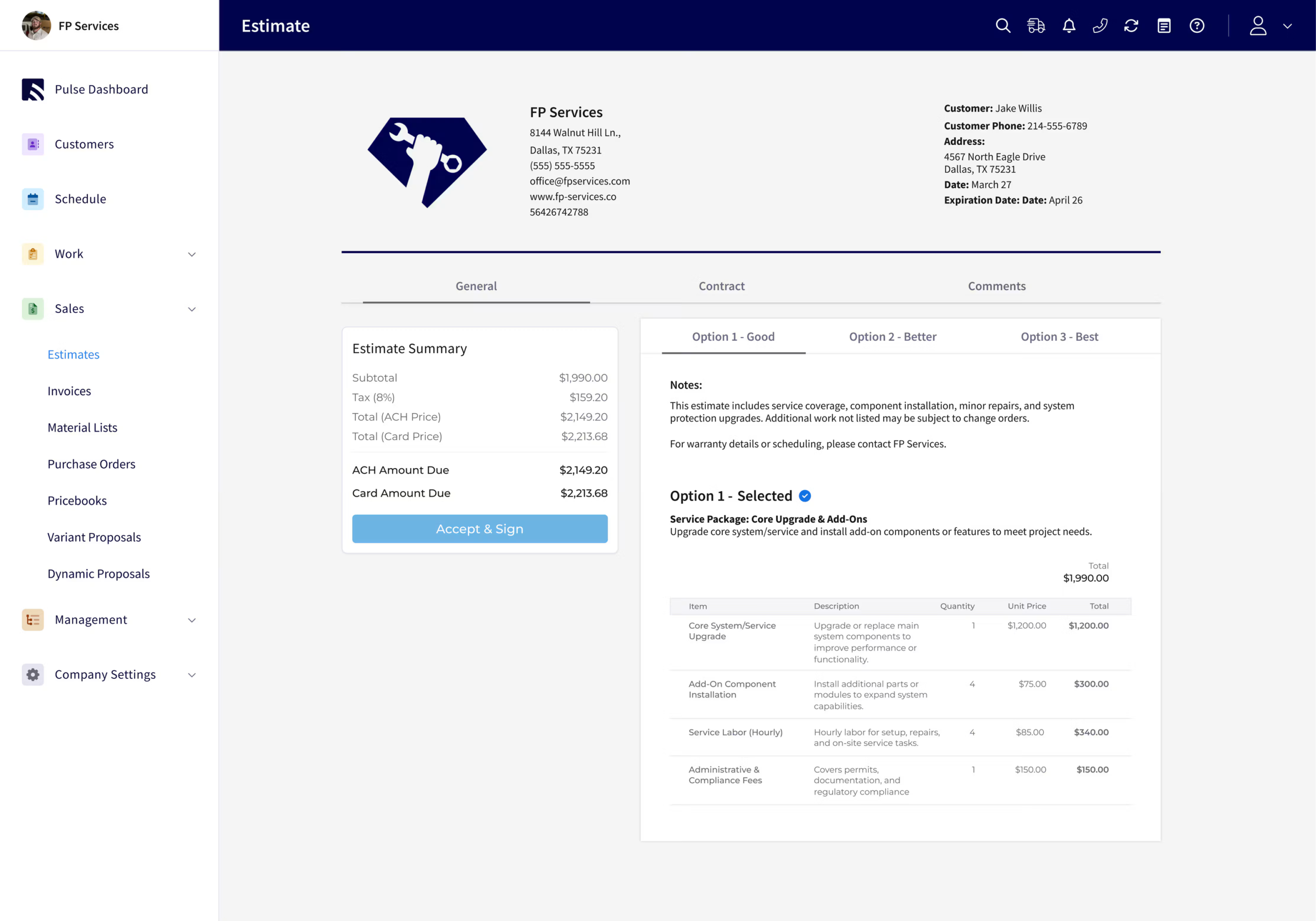
Verdict: FieldPulse is my pick for the best plumbing estimating software for growing teams handling a mixture of repairs, replacements, and custom installations. The software provides more calculation and item-organization control than Housecall Pro or Jobber without ServiceTitan’s implementation weight.
Its strongest advantage is what a technician can do while building the total from a phone. New-item cost entry, markup and target-margin tools, and formula-based quantities reduce the need to send an unfinished calculation back to the office. The complete cost-and-profit analysis remains desktop-only; that is separate from the calculation tools available in the field.
Main trade-off: More flexibility means more setup ownership. Someone needs to maintain the catalog, pricing rules, bundles, and naming conventions, and the interface is denser than Jobber’s or Housecall Pro’s.
Key Features for Plumbing Repairs and Replacements
- Enter the cost of a new part and apply a markup or target margin to calculate its selling price, including on mobile.
- Reuse bundles of labor, parts, and fees rather than adding every component individually.
- Use formula-based quantities when measured work changes between properties.
- Build estimates using recorded materials or purchase-order items, and generate purchasing documents from estimates.
- Group related items while controlling the customer-facing breakdown.
- Record scope assumptions in descriptions and custom fields, with role-based visibility for internal information.
For a water-heater replacement, a bundle can keep the selected heater alongside installation labor hours, associated fittings, removal, and disposal. For measured piping work, configured formulas can calculate quantities from the inputs the technician supplies. These are useful custom assemblies of related items, rather than a claim that the app designs the piping system or identifies every fitting automatically.
The Reece integration brings live supplier pricing and availability into estimates and purchase orders. That helps when current material pricing differs from an old saved cost. FieldPulse also lets users update an item’s repository cost or price while adding it to an estimate.
Inventory Management and Estimate-to-Job Handoff
This is where its extra depth matters for plumbing contractors. A straightforward faucet replacement may be faster in Housecall Pro. A water-heater installation with additional connections or a repipe with changing quantities benefits more from FieldPulse’s bundles, calculations, and document organization. Its inventory management and job costing also provide useful context as the accepted scope moves into actual work.
Price and Value
The reviewed subscription was approximately $99 per user per month before discounts. Sales Suite includes pricebook capabilities and Dynamic Proposals at an additional charge. The Sales Suite/Custom Forms configuration supplied for this review added approximately $85–$100 per month, with the bundle affecting the total.
That makes the base price different from the cost of the complete configured toolkit. Its value is strongest when plumbing contractors use the calculation tools and supporting operations together. A crew can save time by maintaining the customer, estimate, materials, and job in one platform rather than rebuilding the same information across separate apps.
Housecall Pro: Best for Straightforward Residential Estimates
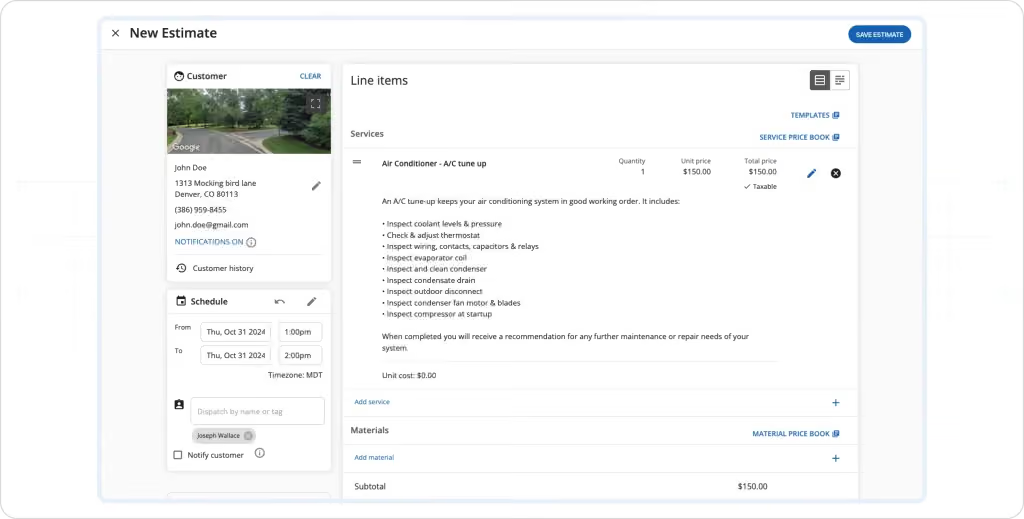
Verdict: Housecall Pro is a strong starting point for smaller plumbing shops that want a cleaner, guided way to build accurate estimates for ordinary repairs. Its speed is most useful when the job has a defined repair and a relatively short list of parts.
Customer lookup is a practical advantage: desktop users can search by name, email, phone, or address. One-off items can be added without saving every unusual part for future use. That reduces catalog maintenance for a plumber who occasionally needs to price a replacement component outside the normal service list.
Main trade-off: Industry-based signup pricing raises the starting subscription without an identifiable feature gain. Important cost controls are also stronger on desktop: during testing, technicians adding a new material on iPhone could enter the customer price without the same underlying cost-entry controls available in the office.
Building Accurate Estimates for Routine Plumbing Work
- With Job Costing enabled, the desktop estimate displays cost and expected profit while the total is being built. A mobile job-costing summary is a different workflow from entering a new part’s cost directly inside an estimate.
- Checklists can sit on estimates, helping technicians document the checks used to define the repair.
- Assigned tasks give the office a clear next action, such as obtaining a part price or arranging a return visit. For plumbing work, that is useful when inspection findings need to reach the person finishing the calculation.
- Housecall Pro also keeps services and materials in separate sections. An item entered into the wrong section had to be recreated during testing. FieldPulse offers more flexible grouping and item-level presentation controls, while Housecall Pro is easier to understand when its predefined organization already fits the shop.
For a toilet or shutoff-valve replacement, that structure can be sufficient. For a repipe involving multiple pipe sizes, access work, and revisions, the mobile cost-entry and organization limits become more consequential. A user friendly interface helps adoption, but the calculation still needs to represent the whole scope.
Price and Value
Housecall Pro adds an upcharge based on the industry selected during signup, despite no identifiable differences in product configuration. In our October 2026 signup comparison, the displayed starting subscription was $59 per month for handyman businesses and $79 per month for plumbing, HVAC, and electrical businesses. For a small plumbing business, that means spending more without an identifiable gain in features or functionality.
Access to its flat-rate pricing tool requires the Essentials plan, starting at $229 per month for 1–5 users. That is the relevant starting point for a plumbing team that needs calculated flat-rate services, rather than the lower advertised entry subscription.
Housecall Pro’s estimating software offers its clearest value through fast adoption for repeatable residential work. A lower starting subscription is less compelling when a field-based owner needs calculation controls that are easier to use from a desktop.
Jobber: Best for Simple Mobile Plumbing Estimates
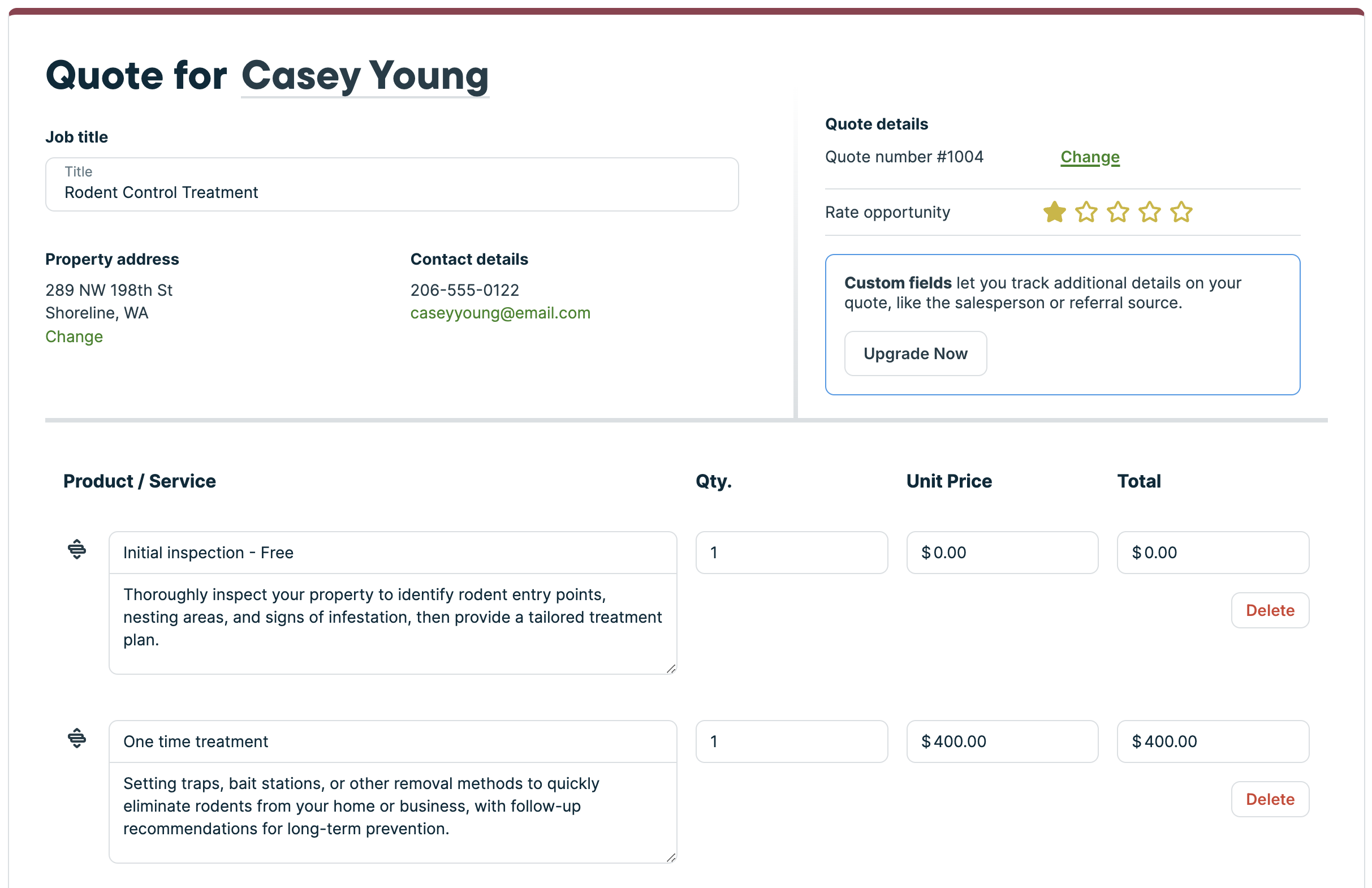
Verdict: Jobber is an approachable mobile estimating tool for solo plumbers and small teams with straightforward jobs. Its iPhone flow was the easiest to navigate in this comparison, with less screen density than FieldPulse.
The quick-create button is within easy thumb reach, and the builder breaks the work into manageable steps. Customer search includes address context, helping distinguish similarly named clients and the property being priced.
Main trade-off: Jobber’s reusable catalog and desktop quote calculations cover basic estimating, but it lacks FieldPulse’s line-item quantity formulas, bundles, and deeper material-list workflows.
Customizable Templates and Desktop Markup Controls
- The Products and Services catalog stores the company’s own reusable labor, material, and equipment items. It is not a managed plumbing flat-rate repair database. A short price book can work well for a crew offering a limited range of familiar repairs.
- Quote templates provide a starting point for common work, while saved items keep the parts and labor consistent.
- On eligible plans, administrators can use quote markups to enter unit cost, calculate selling prices, and see estimated quote margin. These controls were stronger on desktop than in the tested iPhone workflow. Jobber can therefore show expected profitability before a job exists; its limitation is the depth and availability of those tools, rather than an absence of estimating calculations.
For a faucet replacement, saved labor and parts may be enough. A bathroom remodel or larger repipe introduces more related materials and scope decisions. Jobber can list those items, but offers fewer tools to assemble and calculate them automatically. The plumbing estimating process stays manageable when the catalog and job complexity stay manageable.
Price and Value
Jobber Grow pricing starts at $149 per month billed annually or $199 monthly for one user before promotions. Its five-user package lists $229 annually or $299 monthly. Lower plans cost less but do not include the same advanced quote functions.
Those are packages with different seat allowances, not per-technician prices. Jobber’s software delivers its strongest value when the plumbing business can use its simpler workflow without adding several subscriptions to reproduce the operational depth of a more capable alternative.
ServiceTitan: Best for Large Plumbing Teams With Centralized Pricing Rules
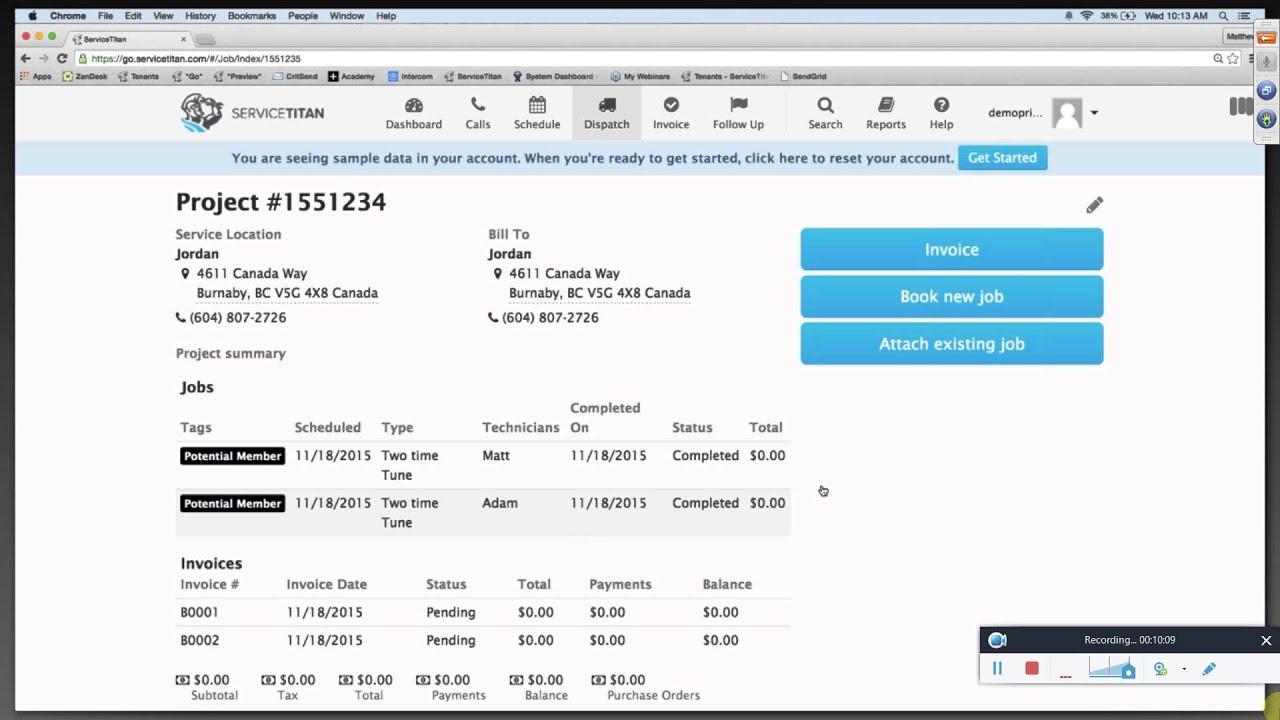
Verdict: ServiceTitan is the strongest fit for a large, high-volume plumbing operation that needs consistent rates and estimating controls across technicians, departments, or branches. Its depth makes sense when centralized rules solve an organizational problem.
Central pricebooks, permissions, and estimate templates help the software maintain the same approach to labor rates, materials, discounts, and selling prices. That matters when many people price similar plumbing jobs and managers need more control than a collection of independently maintained templates provides.
Main trade-off: Implementation and ongoing administration are substantial. For most smaller teams, FieldPulse offers useful cost and markup control with a lighter setup burden.
Configured Margin Checks in the Field
- Sales Margin Control in Field Mobile compares estimate margins with office-configured requirements. It does more than display a number: it can flag a calculation that falls below the company’s rules while the technician is preparing it.
- The margin calculation excludes commissions and bonuses. Its result therefore does not represent final net profit after every business expense. Office setup and user permissions determine the workflow available to the technician.
- For plumbing contractors with several branches, this helps standardize how a water-heater replacement, drain repair, or larger installation is priced. It does not establish the correct labor hours or discover hidden scope. The underlying site assessment and rates still need to match the job.
ServiceTitan is also better suited than the lighter options to coordinating service agreements, equipment histories, purchasing, and reporting at scale. Those supporting operations strengthen its case for a large service organization; they do not make it the best plumbing estimating software for every small shop.
Price and Value
Reported subscriptions supplied for this comparison were approximately $250–$500 per technician per month, with higher totals when additional products are included. Reported implementation costs ranged from $5,000 to $50,000 or more.
The value comes from enforcing consistent processes across a large company. For a small crew that needs parts, time, and a markup, that level of administration is usually unnecessary.
QuoteIQ: Broad Mobile Estimating With Reliability Tradeoffs
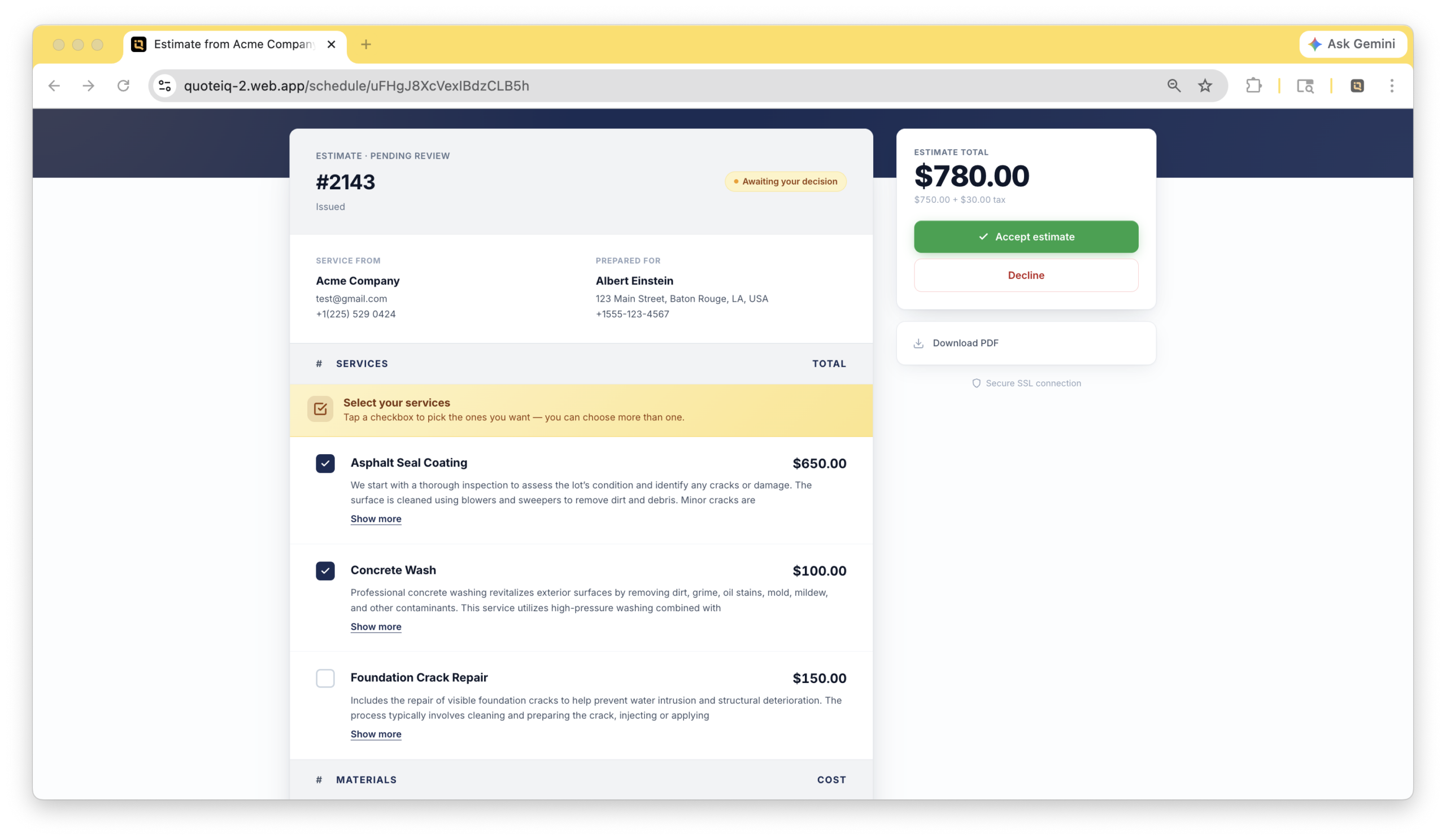
Verdict: QuoteIQ gives small teams a broad estimating toolkit, including mobile AI, manual cost entry, and markup calculation. The software’s field reliability and less developed plumbing-specific operations kept it below the leading choices.
Its estimate types include detailed itemized documents and quicker formats. For this comparison, the important capability is building one total from the contractor’s actual costs rather than relying on an AI-generated selling price.
Main trade-off: Routine tasks frequently took 6–10 seconds to load during testing. After offline mode was enabled, previously loaded estimates disappeared from view, and attempts to create new estimates repeatedly returned errors.
Flexible Inputs, More Responsibility for the Catalog
- QuoteIQ supports reusable services, imported pricing, and templates. Saved templates could not be edited or renamed in the tested configuration, making routine updates more cumbersome when preferred equipment or material pricing changed.
- Its AI tools worked on mobile, unlike comparable functions in the other tested accounts. That can help draft descriptions, but it does not establish a supplier’s actual price or the installation time at a particular property. For a water-heater replacement, the plumber still supplies the equipment cost, connections, removal work, and installation assumptions.
- There is no supplier catalog integration or comparable managed plumbing repair database. A contractor can maintain saved items, but takes more responsibility for keeping the inputs current. QuoteIQ’s breadth is useful; the quality of the calculation depends on the inputs and the reliability of the field workflow.
Price and Value
Pro costs $149.99 per month for four users, including QuickBooks Online synchronization and job costing. Elite costs $299 per month for 10 users and adds inventory and other team functions. AI use draws from the plan’s IQ Credit allowance.
Bundled seats can suit a small crew. For a solo operator needing Pro-level features, the subscription is less compelling. Loading and offline problems also matter more when the technician must finish estimates inside a basement or another location with unreliable reception.
BuildOps: Best for Commercial and Project-Heavy Plumbing Contractors
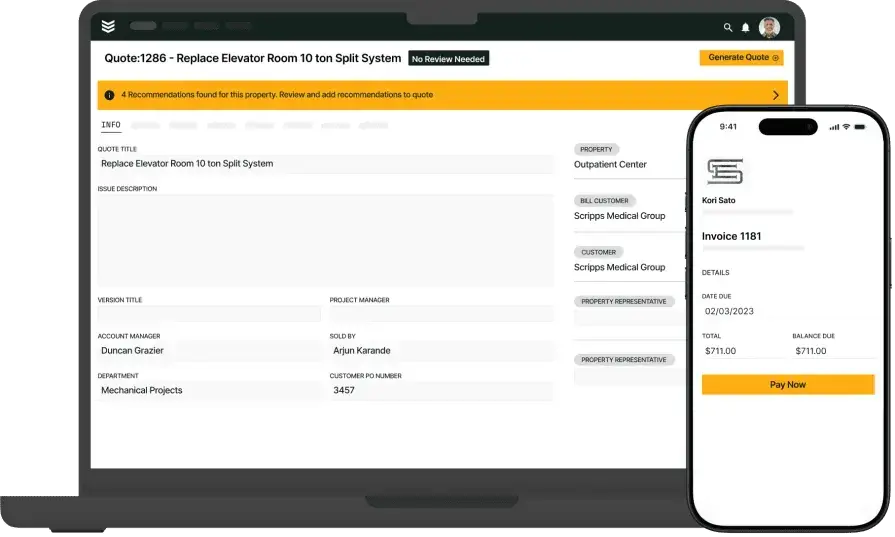
Verdict: BuildOps is worth considering when commercial projects and service operations drive the buying decision. For primarily residential repairs and replacements, it adds more complexity and cost than the estimating task usually requires.
Like Jobber, it has a reusable labor, material, and equipment catalog rather than a managed plumbing flat-rate repair database. That distinction matters: saved company items support reuse, while maintained trade content supplies a separate starting point for repair pricing.
Main trade-off: Its commercial focus is less natural for a small shop seeking gradual adoption and quick residential estimates.
Quote Revisions and Project Management for Commercial Projects
- BuildOps’ commercial quoting software connects costs, margin-aware line items, quote versions, and internal review. Field information can move into office estimating without recreating the property and customer context.
- Its project management tools become more valuable when a piping replacement belongs to a larger renovation with phases, purchasing commitments, and changing scope. Mechanical and plumbing contractors coordinating crews, subcontractors, and project costs have a different need from a plumber pricing a single fixture replacement.
- For a service-and-construction company, preserving project details across estimating and delivery can reduce duplicate data entry. On complex process piping or larger commercial plumbing systems, the estimator still brings the measured scope and appropriate specifications. The operational connection does not replace system design or construction takeoff.
FieldPulse covers lighter project requirements with more residential flexibility. Housecall Pro and Jobber offer simpler starting points for a shop whose work rarely extends beyond ordinary service and replacement calls.
Price and Value
BuildOps uses custom quotes based on headcount and required capabilities. Reported configurations supplied for this review were around $299 or more per user per month. Project management and financial functionality are the main reasons that expense can make sense.
For residential plumbing contractors, the strongest estimating value usually lies elsewhere. BuildOps earns its place when commercial delivery, revisions, and financial coordination are central to the operation.
FieldEdge: Managed Repair Content, but Not My First Choice for Flexible Estimates
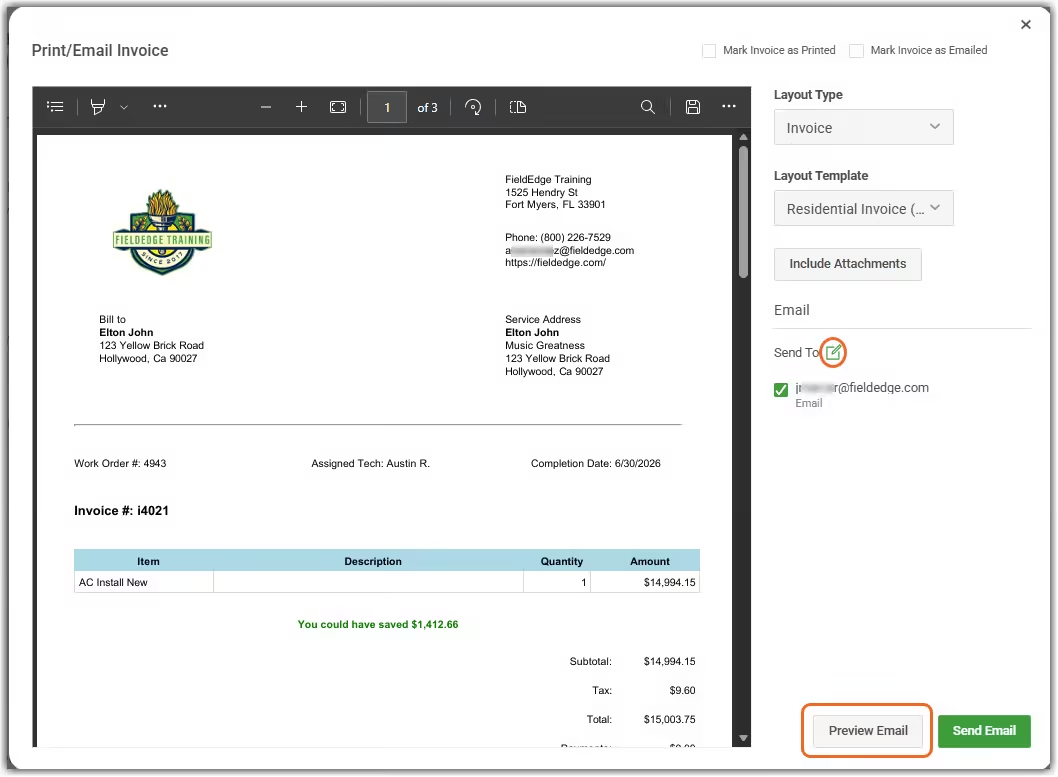
Verdict: FieldEdge is useful for plumbing contractors that prioritize a maintained repair database, especially existing users. It is not my first recommendation for a new buyer seeking flexible estimate calculations and mobile control.
FieldEdge Flat Rate, formerly Coolfront, includes repair content for plumbing, HVAC, electrical, and appliance work. Its advertised 25,000 repairs span the database; that figure should not be interpreted as 25,000 plumbing-only tasks. Prices can be adjusted, and contractors can create custom repairs.
Main trade-off: Its customization and setup burden were harder to justify against FieldPulse, while Housecall Pro and Jobber provided simpler entry points. A large repair catalog does not settle the broader estimating decision.
Where Maintained Repair Content Helps
- Saved repair content reduces the effort of describing familiar work from scratch. It is most useful when the task, material assumptions, and labor requirements match the company’s actual services.
- A water-heater relocation or repipe still needs job-specific quantities, access work, and current equipment costs. A national average is a starting reference rather than a substitute for the company’s actual labor costs and supplier charges. Standard repair content and current material pricing address different parts of that calculation.
- FieldEdge connects quotes with customer history, dispatch, and accounting. Its plan structure separates basic quoting from higher-tier features and additional mobile licenses. That packaging affects the cost of equipping the whole crew.
For a varied residential workload, FieldPulse offers a clearer case through flexible items, bundles, formulas, and mobile calculations. For a shorter service list, Housecall Pro and Jobber are easier to approach.
Price and Value
Reported configurations supplied for this review were approximately $100–$125 per user per month, plus $500–$2,000 for setup. These are reported subscription and implementation figures rather than a universal published rate.
The repair database has value, but it did not outweigh the flexibility and cost tradeoffs for the residential buyer profiles in this guide.
Frequently asked questions
What is the best plumbing estimating software for a small residential business?
FieldPulse is my pick for the best plumbing estimating software for a growing residential business, while Housecall Pro and Jobber suit simpler needs. FieldPulse provides more control over costs, quantities, markups, and related items. Housecall Pro is effective for guided, repeatable work; Jobber offers a particularly approachable mobile experience. Most shops gain more from a system that fits their normal jobs than from the longest feature list.
Can techs access and edit plumbing estimates from their phones?
Yes, techs can access and edit plumbing estimates from their phones on all seven platforms, but the calculation controls differ. FieldPulse supports new-item costs, markup tools, and formula-based quantities on mobile. Housecall Pro and Jobber make basic creation straightforward, while their tested cost controls were stronger on desktop. ServiceTitan’s margin checks require office configuration. QuoteIQ offered broad mobile functions but had loading and offline problems.
How does plumbing estimating software calculate labor costs and profit margin?
Plumbing estimating software calculates labor costs from entered time and cost rates, then uses the included job costs and selling price to calculate estimated margin. Keep the cost paid for labor separate from the rate charged to the customer. Markup and margin also differ: $100 of cost with a 50% markup sells for $150 and produces a 33.3% gross margin. A 50% gross margin on that cost requires a $200 selling price. The displayed result only covers the expenses included in the calculation.
What are labor units in plumbing estimates?
Labor units in plumbing estimates represent expected installation time for a defined item or task, such as installing a valve or a length of pipe. Multiply quantities by the relevant labor units to develop hours, then apply the company’s labor rates. Published labor units may reflect a national average; local conditions, access, and crew productivity can differ. A catalog with labor units is not automatically a complete cost estimate, and none of those assumptions replaces a property assessment.
Can plumbing estimating software calculate repipes from pipe lengths and fixture counts?
Yes, plumbing estimating software can calculate repipe estimates from entered pipe lengths and fixture counts, provided the parts, installation assumptions, and rates are included. Direct measurements or a takeoff establish linear feet of supply piping and the required fittings. FieldPulse’s configured quantity formulas can help calculate related items; simpler catalogs require more manual setup. The estimate still needs access and restoration scope, connections, testing work, and exclusions appropriate to the actual job.
How do supplier integrations improve plumbing estimates?
Supplier integrations improve plumbing estimates by bringing product information, availability, and material pricing closer to the calculation. FieldPulse’s Reece connection supports live pricing and purchasing; other platforms offer different native or third-party supplier connections. Popular supply houses may provide account-specific costs rather than generic retail prices. A maintained repair database supplies service content, while a supplier feed supplies purchasing information. Checking popular supply houses separately still leaves more manual entry than a connected workflow.
Is plumbing estimating software the same as plumbing bidding software or takeoff software?
No, plumbing estimating software, plumbing bidding software, and takeoff software address different stages of the work. Plumbing takeoff software measures and counts from digital blueprints or digital plans; screen takeoff and auto count tools help establish material quantities. Estimating applies costs and selling-price rules. Plumbing bidding software organizes the requirements and submission that turn those figures into a finished bid. A residential service call often starts with an inspection rather than drawings. Construction plumbing estimators may need both measurement and pricing tools to bid faster without losing scope.
How is McCormick estimating software different from a field service platform?
McCormick estimating software combines construction takeoff and bid preparation, while a field service platform connects estimates to customers, scheduling, and ongoing service work. McCormick’s plumbing product combines screen takeoff, pricing, assemblies, and labor units. McCormick estimating software belongs to a different buying decision from choosing the everyday service workflow compared here. Service Fusion is another field-service option outside this seven-platform shortlist. General contracting and specialist trade estimating also involve different document and measurement needs.
Can I revise plumbing estimates when equipment or scope changes?
Yes, you can revise plumbing estimates when equipment or scope changes by updating the affected items, quantities, costs, and descriptions. FieldPulse’s bundles and formulas reduce repeated setup, while BuildOps connects revisions with commercial quote versions. Clear assumptions and exclusions make the reason for a changed total easier to explain. A revised estimate should account for related parts and labor, rather than changing only the main equipment price.
Does plumbing estimating software integrate with QuickBooks?
Yes, plumbing estimating software can integrate with QuickBooks, and all seven platforms in this comparison offer a connection with different versions and plan requirements. QuoteIQ Pro supports QuickBooks Online rather than Desktop. The main estimating benefit is keeping customer and financial information connected as accepted work becomes jobs and invoices. Accounting synchronization is separate from whether a phone provides the calculation controls needed at the job site.
How much does plumbing estimating software cost for a five-person team?
For a five-person team, plumbing estimating software in this comparison includes Housecall Pro Essentials starting at $229 per month for 1–5 users, Jobber Grow at $229 annually or $299 monthly, and QuoteIQ Elite at $299 monthly. Housecall Pro and Jobber include five users in those packages; QuoteIQ Elite includes 10. FieldPulse’s reviewed $99-per-user rate produces a $495 monthly base subscription before modules. A mid tier plan may include more relevant functions than an advertised entry plan. Compare the total cost for the seats and calculation features the crew will use; starting prices do not represent equivalent packages.
Can plumbing estimating software replace spreadsheets and reduce errors?
Yes, plumbing estimating software can replace spreadsheets for everyday service estimates and reduce errors by reusing items, calculations, and customer information. Estimating software takes repeated arithmetic out of the workflow, reducing human error from manual calculations and retyping. It can save time and produce fewer errors, but a pricing problem caused by missing scope still requires a better site assessment. Human error can also enter through stale costs or incorrect quantities. Keep a complete material list and maintain the saved rates.
Which estimating features matter most to residential plumbing contractors?
The estimating features that matter most to residential plumbing contractors are cost entry, markup or margin tools, reusable items, editable quantities, clear scope, and a usable phone workflow. These key features help technicians calculate complete totals for everyday repairs and replacements. Customizable templates support consistency, while job costing compares estimates with the work actually performed. Pipe and fixture quantities matter more as jobs grow; construction measurement features matter less on a short service call.
Can plumbing estimating software help a team bid faster?
Yes, plumbing estimating software can help a team bid faster by reducing repeated item entry and keeping accepted scope connected to the next job. Reusable templates, saved rates, and integrated customer records can save time. Smart scheduling and a dispatch board help coordinate delivery after approval, but they do not fix an incomplete calculation. Keeping the workflow in one platform can support more revenue without recreating each estimate. Sending more bids only helps when the work is priced profitably and the crew has capacity to deliver it.

Olivia Evans
Olivia has more than 10 years of experience researching field-service software for HVAC and other service businesses and improving their marketing and operations. She conducts hands-on workflow tests, documents findings with screenshots and notes, and checks product claims against official vendor documentation.
Author profile →How we test →