
FieldPulse is my first choice for growing plumbing companies that need to turn repair findings, replacement options, and larger installation scopes into clear customer proposals. Jobber is a simpler fit for everyday residential quotes, Housecall Pro deserves a look for repeatable service packages, and ServiceTitan suits larger plumbing operations that need consistent pricing across technicians and branches.
 The right choice depends on what happens during your service calls. Getting approval to replace a leaking faucet is a different task from explaining a sewer repair or selling a whole-home repipe. Your software needs to communicate that difference, carry the agreed scope into the job, and make additional work easy to document.
This guide compares seven field service platforms with quoting and proposal capabilities. It focuses on residential plumbing repairs, water-heater replacements, drain and sewer work, repiping, and commercial plumbing projects.
Updated October 20, 2026. Prices are in US dollars. Plan requirements and pricing sources are linked below.
Plumbing Proposal Software at a Glance
These are different buying situations, rather than seven interchangeable recommendations. FieldPulse is my broadest residential recommendation; BuildOps belongs on the shortlist when commercial project execution drives the decision.
| Software | Where I would shortlist it | Plumbing proposal use case | Main limitation to weigh |
|---|---|---|---|
| FieldPulse | Growing residential plumbing teams | Explain a repipe or replacement with photos, a detailed scope, and selectable options | Dynamic Proposals and pricebook tools require the Sales Suite add-on |
| Jobber | Small shops with straightforward quoting needs | Send a clear fixture-replacement quote with images and optional extras | Full presentation customization uses the web; optional items are less structured than dedicated package comparisons |
| Housecall Pro | Residential shops using repeatable service packages | Present water-heater options or combine an estimate with a membership offer | A more prescribed presentation workflow; package and mobile limits matter |
| ServiceTitan | Large plumbing service businesses and multiple branches | Standardize repair and replacement options across a large technician team | Substantial setup and ongoing pricebook administration |
| QuoteIQ | Small teams wanting branded proposals and mobile AI | Draft a proposal, explain the scope, and include photos and supporting documents | Loading and offline problems in our platform testing; proposal credits on lower plans |
| BuildOps | Commercial plumbing and project contractors | Move a quoted plumbing project into scheduling, cost tracking, and change management | More operational complexity than a small residential shop usually needs |
| FieldEdge | Established service shops prioritizing flat-rate repair pricing | Keep common plumbing repair prices consistent across technicians | Less compelling for flexible project presentations in our tested workflow |
Start With the Plumbing Work You Sell
Plumbing proposal software combines pricing with a customer-facing explanation of the work. It should help a customer understand the problem, the proposed remedy, what is included, and what they are approving.
For a small repair, that may be a short quote with a clear scope and acceptance button. A sewer replacement may need inspection findings, access assumptions, alternative methods, restoration responsibilities, and payment milestones. Both can be effective proposals.
I would choose the software around three types of work:
- Service and repair: Prioritize fast mobile quoting, reusable repair items, customer approval, and a clean transition into invoicing.
- Replacement and improvement: Look for photos, detailed descriptions, alternative scopes, warranties, and optional upgrades. Water heaters, sump pumps, and repiping belong here.
- Commercial and construction: Put greater weight on quote revisions, internal approvals, purchasing, project budgets, and priced changes after the original proposal is accepted.
A polished document matters most when it helps explain the job. For an urgent repair, adding several pages of company information may create more work without helping the customer decide.
How We Evaluated These Platforms
Testing at a glance
- Review period
- October 2026
- Devices
- Desktop and iPhone
- Evidence
- Broader field-service desktop and iPhone testing; current vendor documentation.
- Focus
- Explaining plumbing scope and repair pricing, presenting customer choices, assessing mobile usability, and handing approved work to the field.
- Scope / limits
- Hands-on findings come from the broader field-service review; dedicated construction takeoff is outside scope.
This comparison draws on Tools in the Wild’s October 2026 desktop and iPhone testing of the seven platforms, supplemented by current vendor documentation. The hands-on findings come from our broader field service software review.
I weighted scope clarity, repair pricing, customer choices, mobile usability, and the handoff from approved work to the field. Native functions, paid modules, and separate integrations are distinguished where they affect the buying decision.
The scope is field service management software with proposal tools. If your main requirement is measuring pipe runs and counting fittings from construction drawings, assess dedicated takeoff software separately. A proposal builder does not establish that a platform can perform plan-based quantity takeoffs.
See our editorial methodology for the wider review process.
FieldPulse: My First Choice for Growing Residential Plumbing Teams
FieldPulse offers the most useful balance here for a plumbing company handling both daily repairs and larger residential installations. Its appeal is the ability to explain a substantial job without moving the entire sales process into a separate document application.
In our platform testing, Dynamic Proposals supported branded presentations with company information, photos, reviews, contracts, and signatures. Estimate options, optional items, service bundles, and Good/Better/Best offers gave the team several ways to organize the price.
For a repiping proposal, I would use that flexibility to separate the proposed pipe work from access, fixture connections, and restoration responsibilities. Photos could explain the existing condition, while distinct options could show the difference between a defined partial replacement and a broader scope. Those are proposed uses of the tools, rather than prebuilt plumbing templates you should assume are included.
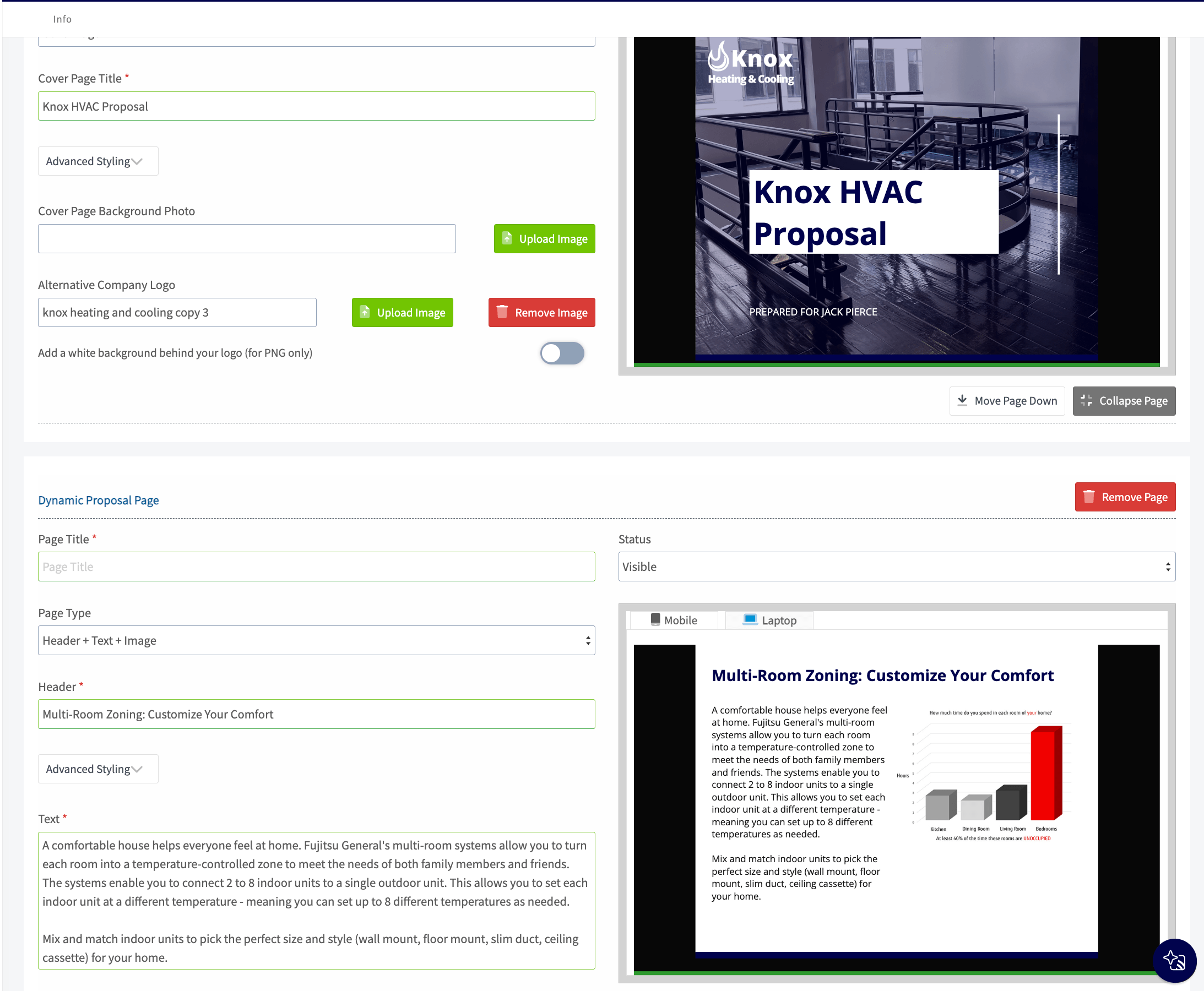
The surrounding operating tools also matter. Our review found detailed asset histories, maintenance agreements, inventory, and project functions. A plumbing company could use those records to keep installed water-heater details, warranty information, and subsequent visits connected after the sale.
The trade-off: You need to budget for the sales features. FieldPulse identifies Dynamic Proposals as part of its Sales Suite add-on. Its current pricing page uses custom, seat-based quotes rather than a public fixed subscription price.
Ask for a quote that explicitly includes the proposal builder, pricebook, required forms, and every field and office user. A base subscription comparison will understate the cost of the setup described here.
Demo task: Build a water-heater replacement proposal with two suitable alternatives, a site photo, removal of the old unit, installation assumptions, and customer acceptance. Then check exactly what the installer sees after approval.
Jobber: Best for Straightforward Residential Plumbing Quotes
Jobber is a good fit when your main problem is getting clear, professional quotes out promptly. I would shortlist it for a small plumbing business doing fixture replacements, routine repairs, and uncomplicated installations.
Its Advanced Quote Customization adds presentation content such as an introduction, images, and attachments around the price. That gives a plumber room to explain the problem and show the proposed fixture or completed work, without building a long sales presentation.
Optional line items let the customer select extras. For example, a faucet replacement could have a separately described accessory where it is appropriate for the job. Keep work necessary to complete the installation in the base scope; an optional checkbox should not make an essential component look dispensable.
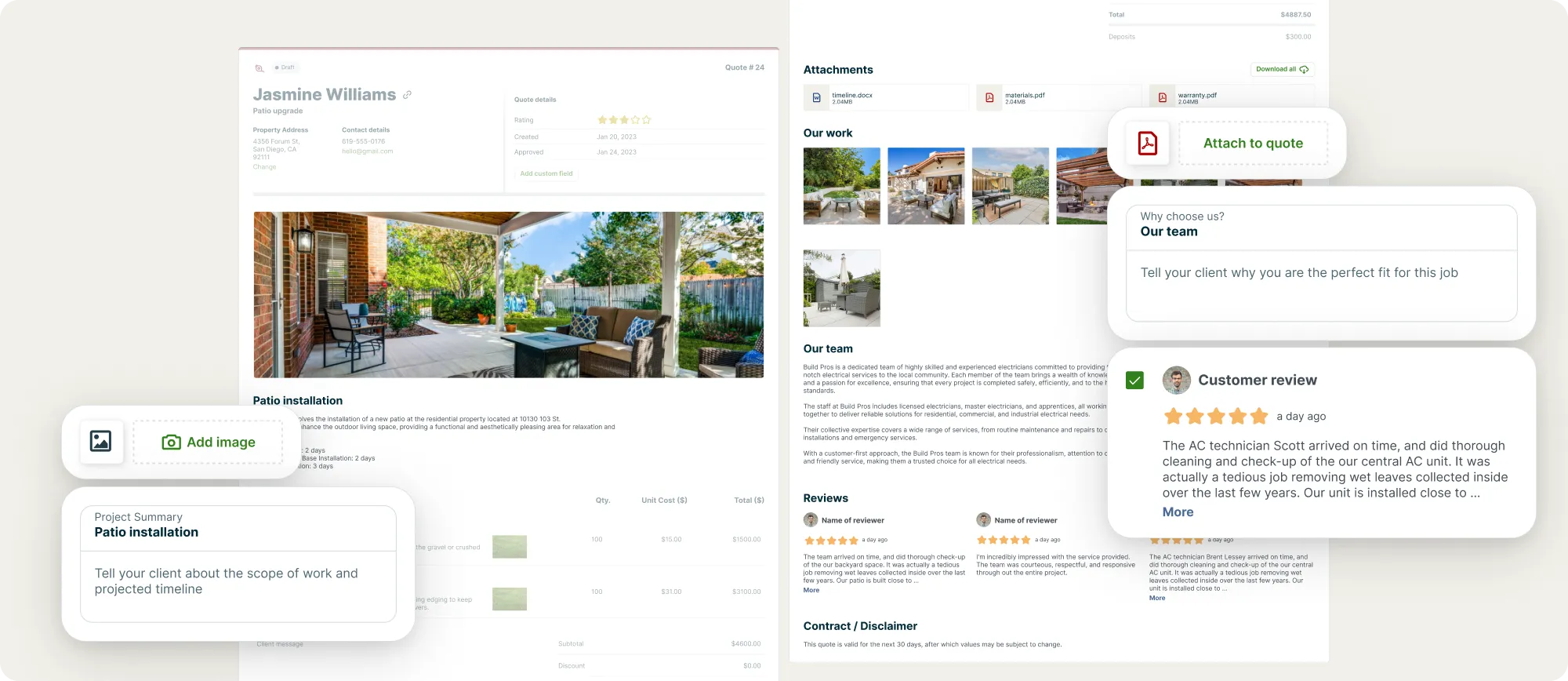
Jobber’s limitation is the structure of those choices. Optional items can support packages, but they do not provide the same guided comparison as a dedicated set of alternative estimates. Check how the customer selects one solution if you regularly sell mutually exclusive replacement options.
The trade-off: Full advanced customization is available on the web with Grow and Plus. Jobber documents partial iOS customization, so a technician should not assume every desktop editing feature is available in the app. Its quote templates can be used in the app but must be created on the web first.
On the current pricing page, regular Grow pricing for one user is $199/month without a commitment, or $149/month equivalent billed annually, before temporary offers. Packages for larger teams cost more.
Demo task: Have a plumber create a quote from a saved template, add a property photo, offer one optional item, and send it from the device they actually carry. Preview the customer’s screen before deciding the workflow is simple enough.
Housecall Pro: Worth Shortlisting for Repeatable Plumbing Service Packages
Housecall Pro becomes more relevant when your proposals follow a repeatable structure: a familiar repair, a choice of suitable water heaters, or a service estimate that also offers a membership.
Its Sales Proposal templates support option images and descriptions in a Good/Better/Best presentation. That can be enough for a homeowner who needs to compare clearly explained choices during a visit.
I would assess it differently from a tool intended for lengthy project narratives. A company selling standard residential packages may benefit more from consistent options than from the freedom to design each page of a proposal.
Housecall Pro also documents a specific Plumbing Package. Its published feature table includes the Sales Proposal Tool and Membership Plans with Essentials and MAX; Pipeline is included with MAX. This makes the plumbing package worth comparing directly with the standard plans.
The trade-off: Our broader platform tests found differences between desktop and mobile estimating, including cost and profit tools. Confirm the particular workflow you need instead of assuming that a proposal visible on a phone is fully editable there.
For a larger repipe or sewer project, test the space available for assumptions, exclusions, photos, and changes to the scope. Structured option selling may suit that job, but you need to see the finished customer document.
Ask for current plumbing-package pricing with the required user count and features. A headline entry price does not tell you what the proposal setup will cost.
Demo task: Present two appropriate water-heater installation options, show the full scope for each, and add a membership offer. Make sure the customer can understand the installation price and any recurring charge separately.
ServiceTitan: Best for Standardizing Sales Across a Large Plumbing Operation
ServiceTitan is most compelling when proposal consistency has become a management problem. A large plumbing company may need dozens of technicians to use approved repair prices, present appropriate alternatives, and pass complete information to dispatch and installation teams.
The platform supports pricebooks, estimate templates, and multiple proposal options. Its proposal-template documentation describes preparing estimates in the office and grouping them into proposals for technicians to present in ServiceTitan Mobile. Those templates can incorporate pricebook services, materials, equipment, and supporting media.
For a plumbing service business, I would use that structure to standardize common repair and replacement categories while leaving room for site-specific conditions. A water-heater proposal should still reflect the actual installation; a template is a starting point for the technician’s assessment.
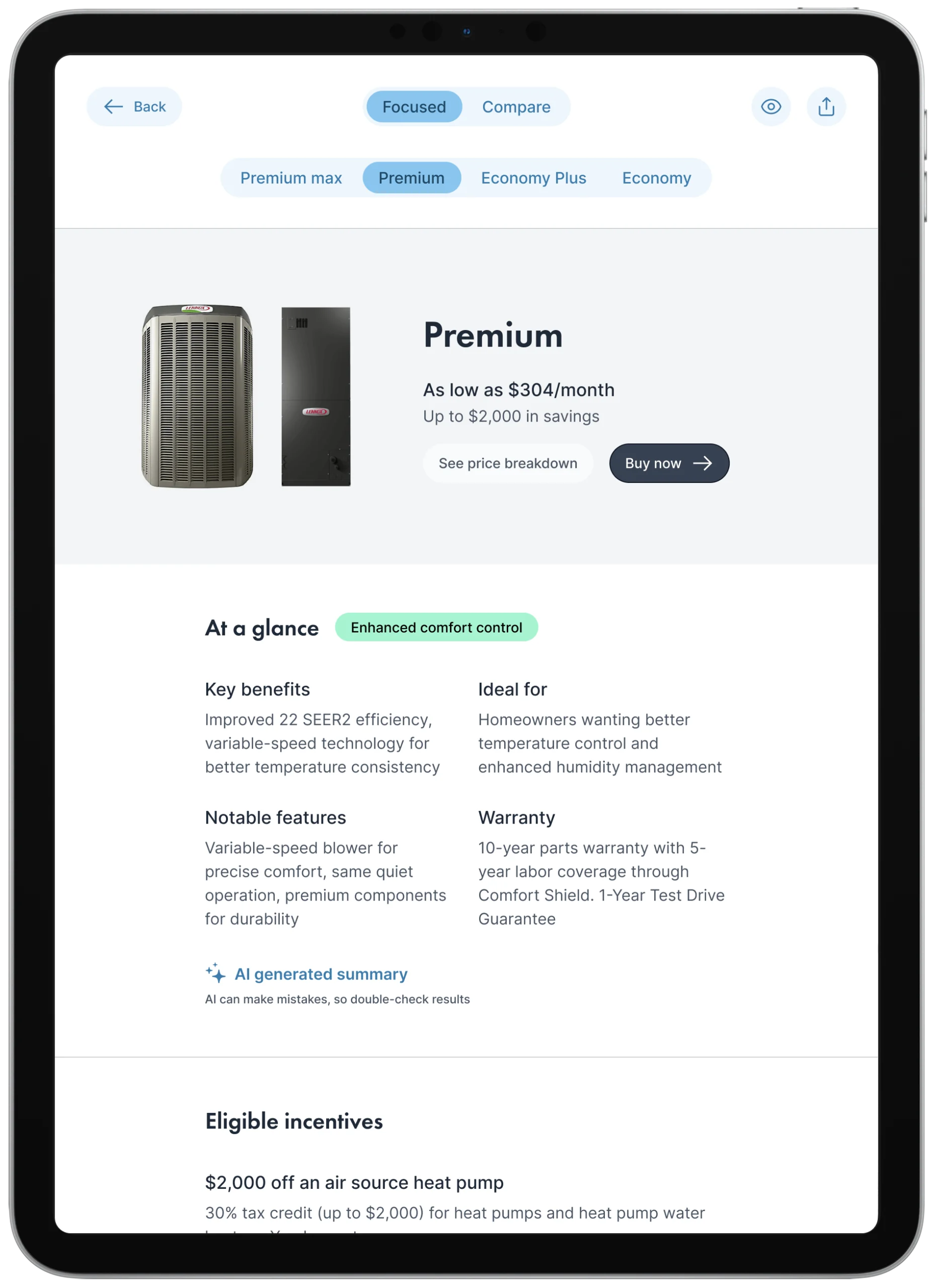
Our platform review also found extensive equipment records, membership tools, inventory, and reporting. Those capabilities become valuable when managers need to connect what was sold with the labor and materials used to complete it.
The trade-off: Someone must maintain the pricebook, templates, permissions, and reporting. ServiceTitan’s mobile template guidance says an estimate template must belong to a proposal template before it can be added through that mobile workflow. Technicians can also create custom estimates.
Its native option-based proposals should be assessed separately from the longer branded-document workflow our original review evaluated through Airship. Do not add a separate presentation application to your budget unless that extra document-building capability solves a real requirement.
ServiceTitan pricing is quoted per technician. Get implementation, optional products, and any external presentation tools itemized alongside the subscription.
Demo task: Have the office change a standard plumbing service price, then show how that change affects the options a technician presents. Follow the accepted option through to the scheduled job and its cost reporting.
QuoteIQ: Broad Proposal Features, With Field Reliability to Check
QuoteIQ offers a substantial presentation toolkit for a small team. Its branded proposals can combine service descriptions, photos, documents, reviews, and customer signing around an estimate.
For plumbing, that gives you space to explain a repair recommendation and include supporting site images. Options and package estimates can help organize different scopes, while AI can draft descriptions that a plumber then checks against the actual findings.
In our October platform testing, QuoteIQ’s mobile AI was usable, but routine tasks sometimes took 6–10 seconds to load. We also encountered errors when trying to create estimates offline and problems viewing previously loaded estimates. These were observations from the tested account and version, not a prediction of every customer’s experience.
That matters for a plumber quoting from a basement or another location with a weak connection. A proposal tool needs to remain workable when the customer is waiting for an answer.
The trade-off: Check both reliability and usage costs. QuoteIQ charges 100 IQ Credits once per estimate when a branded proposal is attached on Essentials, Beginner, and Pro. Elite and Max include proposals without that credit charge; editing or resending the same proposal does not trigger another charge.
The current pricing documentation lists Pro at $199.99/month for four users and Elite at $299.99/month for 10 users for new subscriptions. These reflect its October 2026 pricing update; eligible existing subscribers may retain an earlier rate while staying on their plan.
Demo task: Build the same plumbing proposal with a strong connection and a poor one. Check saved content, images, customer acceptance, and recovery after reconnecting. Review AI-written scope text for invented measurements, omitted access work, and unsupported promises.
BuildOps: Best Fit for Commercial Plumbing Projects
BuildOps belongs on this list because commercial plumbing proposals can become complex operating commitments. A contractor replacing drainage in an occupied building may need to coordinate phases, shutdowns, purchasing, crews, and subsequent changes to the contract.
Its current quoting documentation describes pricebook-based labor and material pricing, multiple quote versions, internal approvals, attachments, and conversion of accepted quotes into jobs or projects. These features connect what the estimator promises with the work the business must deliver.
For this buyer, a proposal’s usefulness depends heavily on its connection to project records. I would give particular attention to who approved the latest revision, which scope was accepted, and whether the project team inherits the supporting information.
Our broader review found commercial tools for construction documents, committed costs, crew planning, project finances, and change orders. Those are relevant when a plumbing contract must stay coordinated across several phases and billing cycles.
The trade-off: I would not choose BuildOps solely to produce a more attractive residential quote. Its commercial depth needs to earn its place through the projects you run. For a small shop doing short service visits, the setup may be more than the business needs.
Pricing is customized around users and the selected tools. Confirm the project modules, accounting integration, and implementation scope in the proposal you receive from BuildOps.
Demo task: Start with a commercial plumbing quote, revise one phase, approve it, and create a priced scope change after the project begins. Check how the original budget and the approved change remain distinguishable.
FieldEdge: Consider It for Flat-Rate Plumbing Repairs
FieldEdge is most relevant here for service businesses that want a managed repair-pricing system. Its Flat Rate product is intended to help teams standardize prices across technicians and service areas, and FieldEdge publishes plumbing pricebook material alongside it.
A repair-focused company may value that consistency more than extensive document customization. The buying question is whether the catalog fits your services and whether it is practical to adjust descriptions, labor assumptions, and prices to match your operation.
In our platform review, FieldEdge was less flexible than the leading options for proposal presentation. Advanced replacement presentations also involved a separate Proposal Pro workflow. I would not assume that an equipment-oriented demonstration establishes how well it handles a plumbing project with detailed access and restoration terms.
The trade-off: A useful repair database does not automatically produce a strong repiping or sewer proposal. Ask to see your own scope rendered in the customer document, and check where staff must go to revise it.
Use FieldEdge’s current plan comparison and a written sales quote to establish the cost of the configuration you need. Clarify which pricing and presentation products are included.
Demo task: Find three common repairs from your actual service history, adjust them to your pricing rules, and prepare the customer quote. Then try a larger installation that cannot be described by one standard repair item.
Four Plumbing Proposal Workflows to Test Before You Buy
Use realistic work from your own business during the demo. The examples below are evaluation scenarios, not claims that every platform includes a template or automated workflow for each one.
1. A Water-Heater Replacement With Meaningful Options
Ask the software to show the proposed model, installation scope, removal of the existing unit, warranty information, and any site-specific work. Separate what is included in every suitable option from what genuinely changes between them.
If you compare a like-for-like replacement with a different type of system, the proposal needs to explain the relevant installation changes. A higher equipment price alone does not explain the full difference in scope.
Check whether the homeowner selects one complete alternative or several independent line items. The customer should not accidentally approve incompatible choices or remove work needed for the selected installation.
2. A Drain or Sewer Recommendation Supported by Findings
Prepare a proposal that connects inspection findings with the recommended next step. Include useful images and a plain-language description of the affected area; test how you share video or larger inspection files if those are part of your process.
Drain clearing, further diagnosis, a localized repair, and a replacement may address different needs. They should not automatically become Good/Better/Best tiers. Present alternatives only when they are appropriate for the observed condition, and explain the limits of each scope.
For excavation or access work, make the included restoration visible. Customers should be able to tell whether the offer addresses the pipe alone or also covers the surfaces disturbed to reach it.
3. A Repipe With Clear Access and Restoration Boundaries
A repiping proposal should make the affected areas, proposed materials, fixture connections, and work sequence understandable. Describe access assumptions, expected service interruptions, and who is responsible for patching or finishing affected surfaces.
Test whether the software makes it easy to reuse the standard parts of that scope while editing the property-specific details. A template that hides an outdated exclusion is less useful than a shorter document the estimator can check reliably.
If a customer changes the scope, inspect how the revised price and acceptance are recorded. You need to know which version the installation team should follow.
4. Additional Work Found After Access Is Opened
Use a scenario in which opening a wall exposes more damaged pipe than the original assessment showed. Ask the vendor to demonstrate how you document the finding, price the extra work, request approval, and connect it to the existing job.
Check whether the product uses a formal change order, a supplementary estimate, or another workflow. What matters is a clear record of the original agreement and the later addition, with both available to the office and crew.
What a Plumbing Proposal Template Should Include
Keep the document detailed enough to define the work and short enough for the customer to understand. These fields provide a practical starting point for evaluating any builder:
| Proposal section | Plumbing details to include |
|---|---|
| Customer and property | Customer name, service address, and the person responsible for approval |
| Findings | Observed problem, affected fixture or pipe section, and relevant inspection images |
| Recommended work | Repair or installation method, materials or equipment, quantities where established, and included tasks |
| Access and restoration | Areas you expect to open or disturb, access assumptions, and responsibility for making surfaces good |
| Alternatives and extras | Complete alternative scopes, plus separately identified optional work |
| Assumptions and exclusions | Conditions the price relies on and work outside the offer |
| Timing | Expected scheduling process, work stages, and anticipated service interruptions |
| Price and payment | Agreed price or estimating basis, applicable charges, deposit, and payment milestones |
| Warranty and next steps | Relevant warranty terms, offer validity, acceptance, and the process for additional work |
Save templates by job type. A faucet replacement, sewer repair, and repipe should not inherit the same assumptions simply because they use the same software.
How to Compare the Real Cost
Price the configuration that completes your proposal workflow. Entry plans, per-user subscriptions, technician licenses, and usage credits are different charging models.
| Platform | Pricing basis to compare | What to include in your budget |
|---|---|---|
| FieldPulse | Custom quote based on seats and requirements | Sales Suite, required forms, and office and field users |
| Jobber | Grow for advanced customization; regular one-user pricing of $199 monthly or $149/month equivalent billed annually | Your actual team package and any additional sales tools |
| Housecall Pro | Current quote for the plumbing package and team size | Essentials or MAX if you need the bundled Sales Proposal Tool |
| ServiceTitan | Custom per-technician pricing | Implementation, selected products, and any external presentation app |
| QuoteIQ | New-subscription Pro at $199.99/month for four users; Elite at $299.99/month for 10 users | Proposal and AI credit usage, plus additional users if needed |
| BuildOps | Custom pricing around users and modules | Project tools, integrations, and the agreed implementation scope |
| FieldEdge | Configuration-specific sales quote | Required repair-pricing and presentation products, users, and setup |
These are not equivalent packages. Use the official pricing and plan links in each review to confirm the offer available to your business; temporary discounts are excluded from the Jobber figures above.
Also account for the work of preparing the system. Someone must clean up repair descriptions, establish prices, check template assumptions, and maintain the catalog. A lower subscription is less attractive if routine proposals still require extensive rewriting.
Frequently asked questions
What is the best plumbing proposal software for a small business?
FieldPulse is the best option for small and growing businesses that needs more presentation flexibility and operational depth and easiest to scale with your business. Housecall Pro is worth comparing when repeatable service packages and memberships are central to the way you sell.
Can plumbing proposal software handle flat-rate and custom jobs?
Many platforms can combine saved service items with custom estimates, but the workflows vary. Test one common flat-rate repair and one installation with unusual access or materials. Check whether changing the custom job affects only that estimate or also changes a reusable item in your catalog.
Do I need plumbing estimating software as well as a proposal builder?
It depends on where your quantities and costs come from. For service work, the platform’s estimate editor and pricebook may be enough. If your team measures drawings and builds detailed construction takeoffs, assess that workflow separately and check how the resulting estimate becomes a customer proposal without re-entering the scope.
Can customers approve plumbing work from their phones?
Online acceptance and signing are available in many of these workflows, but test the exact customer experience. Open a proposal on a phone, choose an option, check the final total, and complete approval. Then verify that the accepted scope and any required payment are recorded where your team expects to find them.
Can one system cover both plumbing and heating or cooling work?
Several of these platforms serve multiple trades. Evaluate each department’s pricing, templates, equipment records, and field workflow separately. For system-replacement sales and the requirements of heating and cooling contractors, see our HVAC proposal software comparison.

Olivia Evans
Olivia has more than 10 years of experience researching field-service software for HVAC and other service businesses and improving their marketing and operations. She conducts hands-on workflow tests, documents findings with screenshots and notes, and checks product claims against official vendor documentation.
Author profile →How we test →