

Concrete estimating software helps contractors calculate materials, labor, equipment, and other job costs, then turn those inputs into one estimated selling price. Reusing saved rates and calculations gives the estimator a consistent starting point, with costs and assumptions visible before work begins.
 This guide compares concrete estimating software for concrete contractors pricing residential driveways, patios, sidewalks, repairs, and light commercial projects in 2026. Complete costing protects the bottom line by including preparation, delivery, placement, finishing, and cleanup alongside the concrete itself.
For concrete estimators, the useful test is whether a changed dimension, supplier price, or access condition updates the calculation without rebuilding the document. The best concrete estimating software for a growing flatwork company must also connect the accepted scope with the crew and office. A driveway with direct truck access and a backyard patio needing a pump should produce different estimates.
This comparison focuses on seven field service platforms. Structural concrete subcontractors handling detailed drawings and rebar schedules may also need specialist concrete takeoff software. The distinction is between measuring the scope and managing the priced job.
Quick Verdict: Concrete Estimating Software for Different Teams
FieldPulse — best overall for growing residential concrete businesses. Quantity formulas, mobile cost entry, markup and target-margin tools, bundles, and material lists balance calculation flexibility with connected operations and light commercial support.
Jobber — best for straightforward estimates and small crews. Its approachable mobile workflow suits teams that already know their quantities. New-item cost entry and markup remain desktop-only.
Housecall Pro — best for repeatable residential workflows. A clean estimate builder, one-off items, checklists, and scheduling help small teams work consistently, with less custom estimating depth than FieldPulse.
QuoteIQ — worth considering for aerial measurements and mobile AI. Its area-measurement tools are relevant to driveways and patios, but imagery cannot establish thickness or site conditions. Loading and offline errors affected our platform testing.
ServiceTitan — best for large operations needing pricing oversight. Central pricebooks, permissions, and configured controls support multiple departments, with substantial implementation and administration.
BuildOps — conditional choice for commercial project management. Quote revisions, purchasing, and project finances are stronger reasons to consider it than residential estimating or concrete takeoff.
FieldEdge — not my first choice for new concrete buyers. Its established service workflows and managed repair content offer a less compelling advantage for custom concrete estimates.
Concrete Estimating Software Compared
Prices are in US dollars. Published rates and reported 2026 configurations are distinguished; billing commitments, user allowances, and implementation differ.
| Platform | Best fit | Estimating strengths | Main drawbacks | Pricing basis |
|---|---|---|---|---|
| FieldPulse | Growing residential/light commercial teams | Formulas, bundles, mobile costs and margin tools | Manual setup; full profit analysis on desktop | Reviewed rate about $99/user/month; sales/forms modules extra |
| Jobber | Solo operators and small crews | Fast mobile quotes, reusable items, approvals and deposits | New-item costs/markup on desktop; lighter calculation structure | Grow: $149/month annually billed or $199 monthly for one user |
| Housecall Pro | Repeatable residential jobs | One-off items, checklists, desktop estimate costing | Mobile estimate cost-entry limitations | Company plans; users, industry, and billing term affect price |
| QuoteIQ | Aerial measurement and mobile AI | MapMeasure Pro, saved services, itemized estimating | Tested loading/offline problems; site assessment still needed | Beginner $99.99/2 users; Pro $199.99/4; Elite $299.99/10 monthly |
| ServiceTitan | Large organizations needing control | Central pricebook, templates, pricing permissions | High implementation and administration burden | Reported $250–$500/technician/month; implementation extra |
| BuildOps | Commercial service/project operations | Quote versions, reusable catalog, project costs | Commercial complexity; separate concrete takeoff requirement | Custom quote; reported configurations around $299+/user/month |
| FieldEdge | Existing service businesses extending their system | Quotes, pricebook, customer/QuickBooks records | Limited reason to choose its repair content for concrete | Reported $100–$125/user/month plus $500–$2,000 setup |
How We Tested
Testing at a glance
- Review period
- October 2026
- Devices
- Desktop and iPhone
- Evidence
- Trial and paid-account evaluations with current documentation; existing desktop and iPhone observations.
- Focus
- Building concrete estimates, calculating quantity-based prices, handling allowances and exclusions, revising dimensions or costs, and saving or reconnecting on site.
For this October 2026 comparison, Tools in the Wild combined its trial and paid-account evaluations of FieldPulse, Jobber, ServiceTitan, QuoteIQ, BuildOps, Housecall Pro, and FieldEdge with current official documentation. Desktop and iPhone observations informed the assessment of concrete estimating software for businesses from owner-operators to roughly 50 field employees.
I assessed five tasks concrete estimators encounter:
- Building detailed estimates: Labor, concrete materials, equipment, purchased services, and reusable combinations.
- Calculating price: Quantities, material costs, labor rates, markups, target margins, and included expenses.
- Handling uncertainty: Allowances, access assumptions, and exclusions leading to one total.
- Revising estimates: Changing dimensions, thickness, supplier costs, or crew hours without restarting.
- Working on site: Mobile versus desktop controls, saving, loading, and reconnecting.
Accurate estimates depend on complete inputs. The emphasis is the working estimating calculation and its handoff, rather than decorative proposal output. Read our editorial methodology.
What Is Concrete Estimating Software?
Concrete estimating software prices a defined scope from measured quantities, rates, and assumptions. Good concrete estimator software keeps the quantity separate from the installation costs, producing detailed estimates that remain understandable when the scope changes.
An estimate develops an expected cost and selling price. A quote presents the offered scope, price, and terms. A bid packages an offer for competitive work, while a proposal explains the solution. Concrete estimating supports the calculation beneath those documents; it does not make every bidding process identical.
Many contractors want an all-in-one platform connecting lead capture, estimates, jobs, and invoices. Others need different tools for measurement and operations. Choose the estimating solution around the problem: field service estimating, specialist material estimating, or a combination.
Concrete Takeoff Software Versus the Operating Platform
Concrete takeoff software measures slabs, footings, walls, and reinforcing from digital plans. On-screen takeoff turns marked areas, lengths, and counts into quantities. An operating platform applies prices and connects the result with customers, crew scheduling, invoices, and accounting tools.
For concrete subcontractors bidding from uploaded plans, concrete takeoff workflows may include rebar takeoff, formwork, and concrete-specific assemblies. Those assemblies associate several cost components with measured scope. Concrete subs should distinguish a reusable service template from concrete-specific assemblies that recalculate each component.
Takeoff-only tools can supply quantities without running the business. Conversely, a general estimating platform can accept quantities without performing digital takeoff. Evaluate takeoff and estimating together when measurement is the bottleneck, while checking which system owns the accepted job.
Concrete Measurements: What a Concrete Calculator Supplies
A concrete calculator converts dimensions into quantities. For a rectangular slab, feet × feet × thickness in inches ÷ 324 gives theoretical cubic yards. A 12-by-20-foot slab at a specified four-inch thickness contains about 2.96 cubic yards before an ordering allowance.
That concrete volume is only one cost input. Concrete slabs may also require demolition, base preparation, forms, reinforcement, delivery, pumping, placement, finishing, joints, and cleanup. Material costs and labor rates determine the price of each component.
A concrete calculator helps prevent manual formula errors when units and inputs are correct. Automatic cubic yard calculation does not decide the specified thickness, waste allowance, or site conditions. Keep cubic yards, linear feet, hours, and fixed fees on the appropriate items; changing thickness does not increase every quantity proportionally.
The same project can therefore need a concrete calculator, an estimating tool, and project management. Connecting these digital tools is valuable only when the project details and revision assumptions remain visible.
Concrete Estimating Features Compared
This matrix describes established workflows rather than treating every template as a concrete assembly library.
| Capability | FieldPulse | Jobber | ServiceTitan | QuoteIQ | BuildOps | Housecall Pro | FieldEdge |
|---|---|---|---|---|---|---|---|
| Reusable items | Detailed repository | Products & Services | Central pricebook | Saved/imported services | Reusable catalog | Price Book/one-off items | Pricebook/service items |
| Quantity approach | Configurable formulas | Enter quantities | Configured templates/items | Aerial area plus entered quantities | Enter commercial quote quantities | Standard quantity/rate items | Item quantities/prices |
| Reusable combinations | Bundles and groups | Quote templates | Configured templates/groups | Templates/packages | Catalog and quote versions | Templates | Templates/services |
| Cost controls | Costs, markup, target margin | Costs/markup on eligible desktop plans | Configured rate/margin rules | Cost/markup; job costing on Pro+ | Margin-aware lines | Desktop estimate cost/profit | Configured item pricing |
| Field distinction | Costs, markup, formulas | New-item costs/markup on desktop | Role/configuration dependent | Mobile AI; tested reliability problems | Field/office project connection | Tested new-material cost limitation | Package-specific mobile access |
| Concrete scope | Contractor configures rules | Contractor supplies calculations | Requires trade-specific setup | Area needs thickness/site inputs | Concrete takeoff remains separate | Stronger for repeatable workflow | Repair content is not a concrete library |
FieldPulse: Best Concrete Estimating Software for Growing Residential Teams
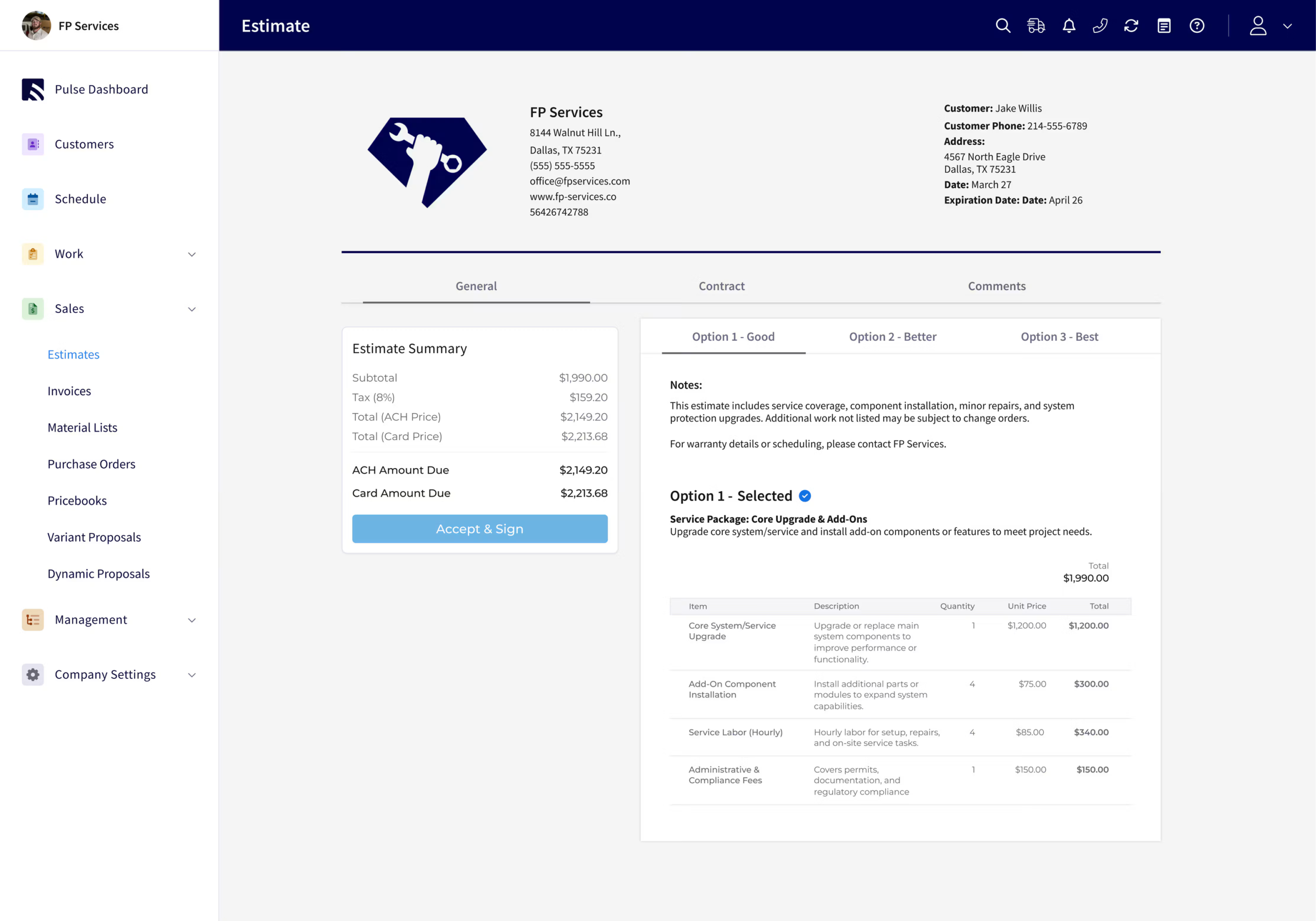
Verdict: FieldPulse is my pick for growing residential concrete businesses needing varied flatwork estimates and light commercial support. It offers more calculation flexibility than Jobber or Housecall Pro, with less implementation weight than ServiceTitan.
Formula-based quantities let concrete estimators define measurement rules and enter their variables. A configured rule can support automatic cubic yard calculation, provided the company sets the units correctly. The software supplies the estimating framework; the contractor supplies the specification and ordering assumptions. For concrete slabs, a configured rule should return cubic yards using the chosen dimensions and specified thickness.
Estimating Concrete Work: Capabilities
Bundles and groups help reuse and organize preparation labor, forms, reinforcing, and finishing items. Concrete contractors can use concrete assemblies when related items belong together, but a saved bundle should not be mistaken for a complete library of concrete-specific assemblies with engineered relationships.
Mobile new-item cost entry and markup/target-margin tools help when a supplier or pump-hire price changes on site. Material lists, purchase orders, files, and project links connect estimating to preparation and purchasing in one platform.
Main trade-off: Someone must maintain units, formulas, items, and labor assumptions. New items enter the Item List, adding friction compared with Housecall Pro’s one-off entry. Full profitability analysis remains desktop-only.
Estimating Costs and Value
The reviewed 2026 rate was about $99/user/month. Pricebook and Dynamic Proposals require the paid Sales Suite; Custom Forms is another paid module. This concrete estimating software earns its value through connected estimating, materials, jobs, and invoices, rather than HVAC supplier content. FieldPulse also supports alternative company profiles; businesses comparing multi-entity profiles should distinguish branding from consolidated accounting.
Jobber: Best for Concrete Contractors With Small Crews
Verdict: Jobber suits concrete contractors who already have their quantity and pricing method and want an approachable way to send estimates and schedule work. Its mobile estimating interface has a lower learning curve than FieldPulse’s denser workflow.
Reusable Products & Services and quote templates can hold materials, equipment, and labor rates. Jobber’s concrete contractor workflow connects estimating with approvals, deposits, multiple visits, and invoicing. That can keep preparation, pouring, and follow-up organized in one workflow.
Main trade-off: New-item cost entry and markup remain desktop-only. Concrete estimators can build a mobile quote, but an unexpected underlying cost may send part of the calculation back to the office. Jobber also offers less formula and grouping flexibility than FieldPulse; concrete subs with complex calculations may need other tools.
Estimating Costs and Value
Grow is $149/month annually billed or $199 monthly for one user, before promotions. Five users cost $229 annually billed or $299 monthly. Richer estimating and job costing depend on plan. For a small crew, that package structure can be attractive, provided the concrete estimating software covers the work without accumulating separate subscriptions.
Housecall Pro: Best for Repeatable Residential Concrete Estimating
Verdict: Housecall Pro works well for smaller concrete contractors who prefer a clean, guided builder. Fast customer lookup and one-off items make a straightforward estimate less cumbersome than a heavily customized process.
Estimating templates, attachments, and checklists help standardize the site visit. Assigned tasks can give the office responsibility for a revised supplier price or return visit. Its concrete industry page connects estimating, customer information, scheduling, and billing.
Main trade-off: The tested mobile builder allowed a new material’s selling price without its underlying cost. Desktop estimate cost/profit tools were more useful for financial review. Housecall Pro also offers less granular grouping and display control than FieldPulse, which matters when concrete assemblies contain several internal components.
Estimating Costs and Value
Housecall Pro’s company subscriptions vary with industry, users, billing term, and add-ons. Compare the package covering the actual estimating workflow and accounting connection. In the concrete industry, a simple estimate builder is good value for routine concrete projects; that advantage narrows when the business needs deeper project management and custom estimating controls.
QuoteIQ: Best for Aerial Area Measurements and Mobile AI
Verdict: QuoteIQ is worth considering when driveway or patio measurement is an important part of concrete estimating. It combines aerial tools, saved services, and mobile AI, but reliability problems weakened our field experience.
MapMeasure Pro traces visible slab areas and puts area into the estimate. That differs from drawing-based digital takeoff: imagery cannot establish thickness, base, reinforcement, or access. Concrete estimators still need supplier figures and labor rates to turn the measurement into a defensible estimating total. Area is a starting point; cubic yards require a specified thickness.
Main trade-off: Our tests encountered routine 6–10-second loads, estimates disappearing from view after offline mode was enabled, and errors creating new estimates. Saved templates also had editing and renaming restrictions. AI can draft descriptions and pricing, but accurate estimates require reviewing the inputs behind the result.
Estimating Costs and Value
Current pricing lists Beginner at $99.99/month for two users, including MapMeasure Pro; Pro at $199.99 for four, adding job costing and QuickBooks; and Elite at $299.99 for 10, adding inventory and other operations. IQ Credits and extra users affect cost.
QuoteIQ’s concrete estimating software is more compelling when measurement and business administration need to share one platform. A concrete calculator or specialist plan takeoff may still be necessary for quantities the image does not supply.
ServiceTitan: Best for Large Organizations Needing Estimating Oversight
Verdict: ServiceTitan is the strongest fit for a large trade organization needing central pricebooks, estimating permissions, and financial oversight. Its concrete estimating software case depends on organizational control rather than specialist concrete takeoff.
Configured templates and pricing rules help multiple estimators use a consistent process. Purchasing, project management, and reporting connect the accepted calculation with delivery. Concrete subcontractors operating within a larger trade business may value those controls more than another standalone estimating tool.
Main trade-off: The company still supplies concrete quantities, production assumptions, and supplier prices. A centralized trade pricebook is not automatically a library of concrete assemblies or a rebar takeoff engine. Field Mobile functions also depend on configuration and permissions; the office platform remains broader.
Estimating Costs and Value
Reported 2026 configurations were approximately $250–$500/technician/month, with substantial implementation costs. ServiceTitan’s estimating overview distinguishes basic apps from wider operating systems. That premium makes sense when cross-department controls and project management solve a real problem; it is difficult to justify for solo contractors producing short estimates.
BuildOps: Conditional Fit for Commercial Concrete Operations
Verdict: BuildOps deserves consideration when commercial concrete estimating is part of a larger service and construction operation. Its established commercial-trade strength does not make it a dedicated concrete takeoff system for commercial concrete projects.
Reusable labor/material/equipment items and central quote versions keep revisions connected. Project management, purchase orders, subcontract commitments, phases, budgets, and costs provide context after acceptance. Those links can matter to concrete subcontractors working with general contractors on changing commercial scope.
Main trade-off: BuildOps does not become the best concrete estimating software simply by offering deeper project management. Concrete subs needing on-screen takeoff, production-based concrete-specific assemblies, or detailed bid day analysis must assess that estimating requirement separately from crew management and commercial operations.
Estimating Costs and Value
BuildOps uses custom proposals. Reviewed configurations were around $299+/user/month, with bundles affecting cost. The investment is easier to justify when the company uses its commercial depth throughout project completion. For residential concrete estimating software, FieldPulse’s flexibility or Jobber’s simplicity is generally a clearer starting point.
FieldEdge: Not My First Choice for New Concrete Buyers
Verdict: FieldEdge is less persuasive for concrete estimating than for established service-trade operations. Its managed repair database does not remove a concrete contractor’s need to price site conditions, placement, and finishing.
Existing users may value keeping estimates with customer records and accounting tools. Select includes basic quotes, while Premier adds multi-option quotes and mobile licenses. For concrete contractors already using FieldEdge, the existing operating connection can matter more than a new estimating feature.
Main trade-off: New buyers have clearer choices: FieldPulse for custom calculations, Jobber or Housecall Pro for simpler estimating, and QuoteIQ for aerial area measurement. FieldEdge’s repair content is not a concrete cost database, making its estimating setup burden harder to justify for this trade.
Estimating Costs and Value
Reported 2026 pricing was $100–$125/user/month plus $500–$2,000 setup; current public plans use custom quotes. Concrete contractors choosing estimating software primarily for flatwork should judge the calculation and handoff before paying for an operating structure built around other service needs.
Frequently asked questions
What is the best concrete estimating software for small businesses?
FieldPulse is the best concrete estimating software in this comparison for a growing residential business needing flexible calculations and connected operations. Jobber is simpler for small crews with established quantities and rates. The best estimating platform depends on whether the main problem is calculation control, measurement, or carrying accepted work into the job.
How much does concrete estimating software cost?
Concrete estimating software cost depends on users, features, and billing commitment. A five-person team can pay $229/month for Jobber Grow with annual billing, $224.99 monthly for QuoteIQ Pro with one added user, or about $495 at the reviewed FieldPulse rate before modules. Those are different packages; the lowest entry subscription may omit required estimating functions.
Can a concrete calculator replace concrete estimating software?
A concrete calculator can replace concrete estimating software only for a narrow quantity calculation, rather than the complete job workflow. It can calculate cubic yards, but precise estimates also need preparation, placement, labor, equipment, and commercial assumptions. A concrete calculator does not automatically connect customer acceptance with scheduling and billing.
Can concrete estimators create and revise estimates from their phones?
Yes, concrete estimators can create and revise estimates from their phones, but financial controls differ. FieldPulse supports mobile estimating cost entry, markup, and formulas; Jobber’s new-item cost entry and markup remain desktop-only. Housecall Pro’s tested mobile estimate had new-material cost limitations, while QuoteIQ encountered loading and offline problems. Field access matters as much as a feature list.
Can concrete takeoff and estimating share one platform?
Yes, concrete takeoff and estimating can share one platform when the chosen product supports both measurement and pricing. The field service systems here should be assessed for their established workflows rather than assumed to include drawing measurement. Takeoff estimating often starts with a specialist tool, then passes quantities into the operating system. Keeping revision ownership clear matters more than the single-platform label.
What should commercial concrete subcontractors look for?
Commercial concrete subcontractors should prioritize reliable concrete takeoff, production assumptions, revisions, and cost control. Concrete takeoff software may provide digital takeoff and rebar measurement before the bid reaches an operating system. Takeoff estimating requirements for structural work differ from residential flatwork. During the estimating review, test whether the team can customize assemblies and preserve changed quantities through the accepted scope.
Can AI measure concrete from uploaded drawings or photos?
Yes, AI can help measure concrete from drawings or photos, but the source determines what it can establish. AI-assisted takeoff of plans is different from tracing a visible driveway in aerial imagery. Neither approach supplies every site condition or validates the construction design. Aerial square footage still needs specified thickness before it becomes cubic yards, and pricing needs the contractor’s own cost inputs.
How does complete costing protect the bottom line?
Complete costing protects the bottom line by including costs that an area-only price can miss, such as pumping, disposal, rental equipment, and return visits. Markup and margin also differ: $6,000 with 25% markup produces $7,500 and a 20% margin; a 25% margin requires $8,000. Estimating accuracy comes from complete inputs, not the software label.
How should concrete estimating connect to the rest of the job?
Concrete estimating should carry the accepted scope, quantities, assumptions, and price into the working job. An all-in-one platform is useful when estimating, purchasing, crew scheduling, and accounting share dependable records. Other tools may handle detailed takeoff or specialty concrete calculations. Keep estimating responsibilities clear so changes reach both the office and field without duplicate manual entry.

Olivia Evans
Olivia has more than 10 years of experience researching field-service software for HVAC and other service businesses and improving their marketing and operations. She conducts hands-on workflow tests, documents findings with screenshots and notes, and checks product claims against official vendor documentation.
Author profile →How we test →